

1
Open the employee invitation section
Sign in to app.eazybe.com as an admin of your main organization. Open Staff and select Add Employee to invite an employee.
2
Enter the employee details and send the invitation
In Add employee, enter Full name, choose Employee Role, and enter the employee’s Email. Complete WhatsApp Number, Team, and Working Hours if needed, then select Send Invite.Eazybe sends an invitation to that email address. The employee can use the email link or sign in directly at app.eazybe.com with the same email.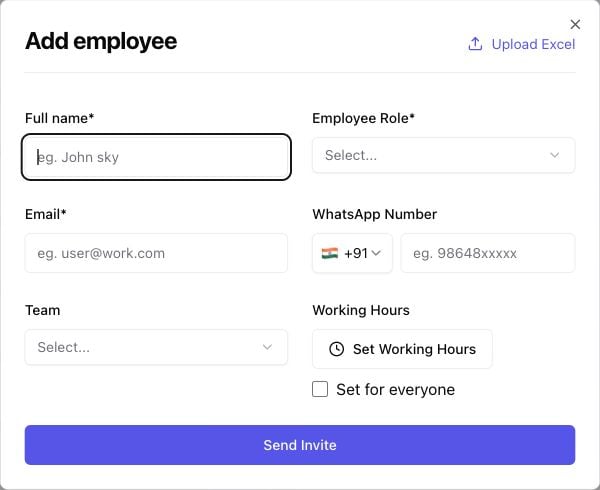
Ask the employee to install the extension and sign in before joining your organization. Send them the employee onboarding guide.
Share your main organization’s code
On the Staff page, find ORGANIZATION CODE and use Copy Organization Code. Share it with the invited employee. You can also find Organization Code in the Eazybe My Account panel inside WhatsApp Web. Confirm that Organization Name is your main organization before copying its code. The employee opens Join Organisation in the extension and pastes your code into Organization Code. After they join, check that they appear in your main organization’s Staff list with the intended role.Finish CRM setup
If your organization uses HubSpot, Salesforce, or Zoho, connect the CRM as an admin if it is not already connected. Employees should be mapped automatically when the admin has connected the CRM; if someone is not mapped, use Settings → User Mapping within that CRM integration. Follow the CRM mapping guide →Frequently asked questions
What if the employee does not receive the email?
What if the employee does not receive the email?
Check the email address you entered and ask the employee to check spam or junk. They can also open app.eazybe.com directly, sign in with that same email, and use your organization code in the extension.
Does an invitation also connect the employee's CRM?
Does an invitation also connect the employee's CRM?
The invitation and CRM setup are separate. For HubSpot, Salesforce, or Zoho, check automatic mapping after the employee joins. For other CRMs, the employee needs to integrate their own account.