> ## Documentation Index
> Fetch the complete documentation index at: https://help.eazybe.com/llms.txt
> Use this file to discover all available pages before exploring further.

# Şablon Gönderme ve Yanıt Bekleme

> Eazybe ile HubSpot iş akışından WhatsApp şablonu göndermeyi, yanıt beklemeyi ve koşullu dallar oluşturmayı öğrenin.

Bu kılavuzla WhatsApp şablonu gönderen ve kullanıcının yanıtına göre devam eden bir HubSpot iş akışı oluşturabilirsiniz.

## Ön koşullar

<CardGroup cols={2}>
  <Card title="HubSpot Hesabı" icon="hubspot">
    İş akışı erişimi olan etkin bir HubSpot hesabı
  </Card>

  <Card title="Eazybe Entegrasyonu" icon="plug">
    HubSpot'ta yüklü WhatsApp Integration by Eazybe
  </Card>
</CardGroup>

## HubSpot iş akışınızı oluşturun

<Steps>
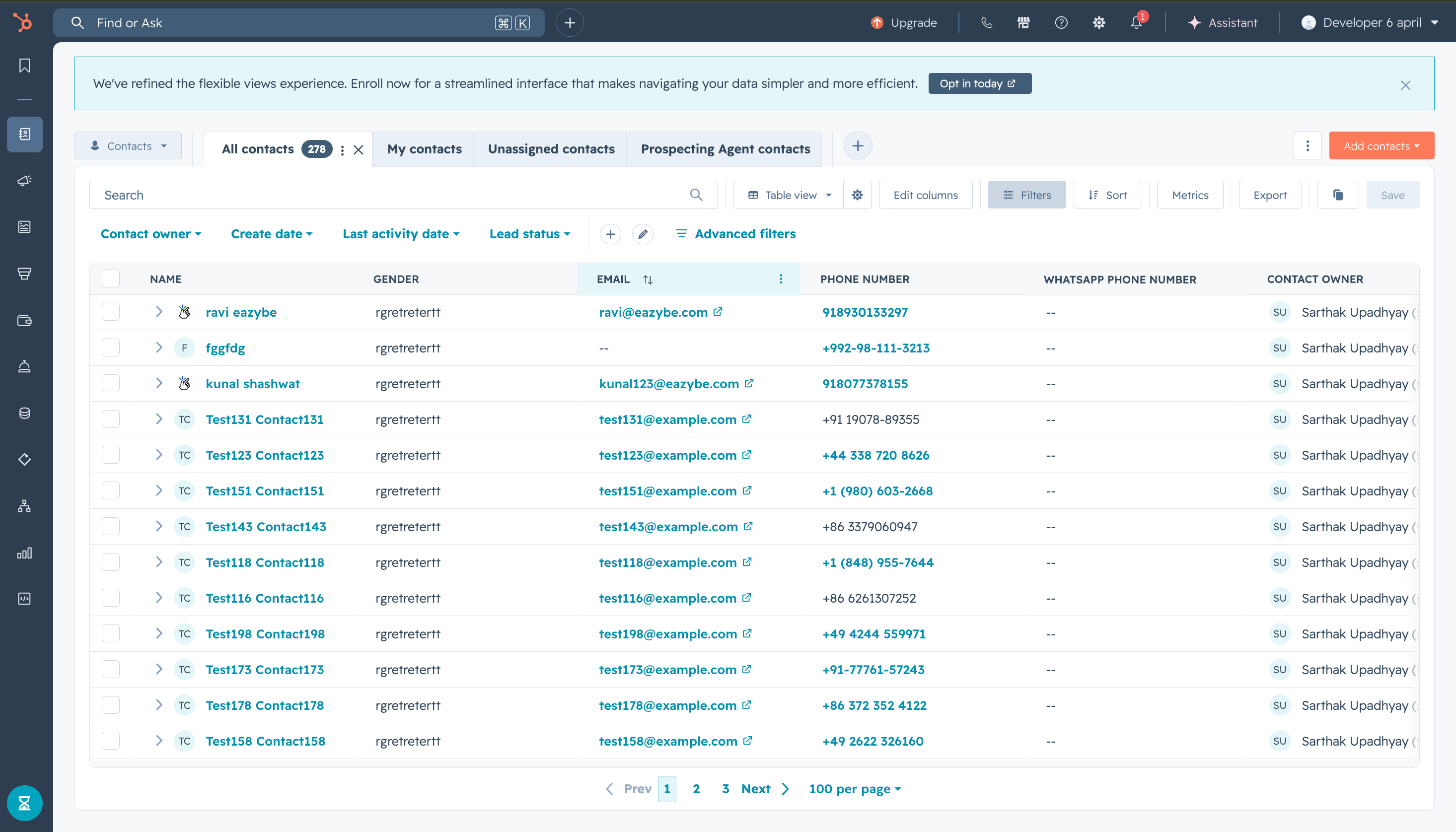
  <Step title="HubSpot hesabınıza erişin">
    HubSpot hesabınıza giriş yapın.

    <img src="https://mintcdn.com/eazybe/NZtXvr5CRt0MZpuu/images/hubspot-wait-reply-access-account.png?fit=max&auto=format&n=NZtXvr5CRt0MZpuu&q=85&s=5c2febc664d4cdc1c91db8c19b451c13" alt="HubSpot'a erişin" width="2932" height="1676" data-path="images/hubspot-wait-reply-access-account.png" />
  </Step>

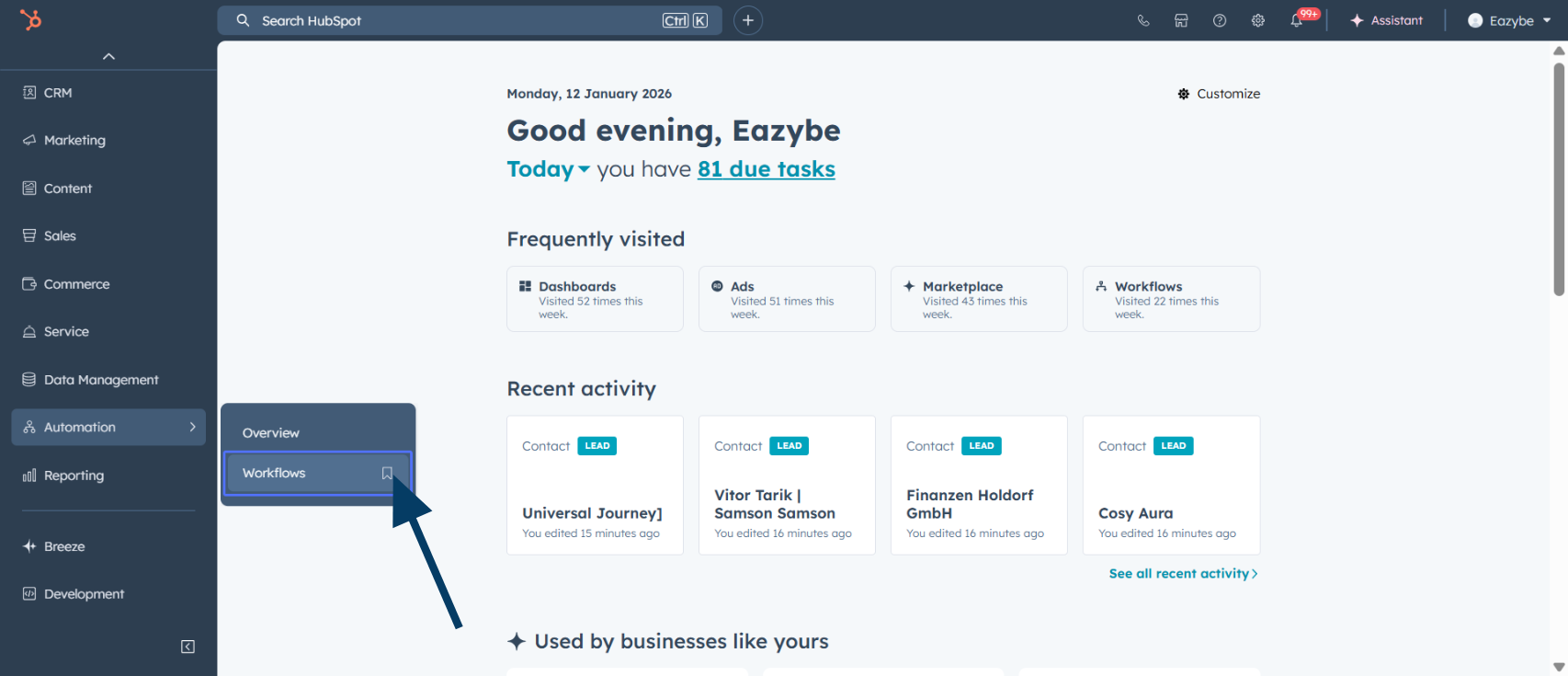
  <Step title="Otomasyona gidin">
    Ana menüde **Automation** seçeneğine tıklayın.
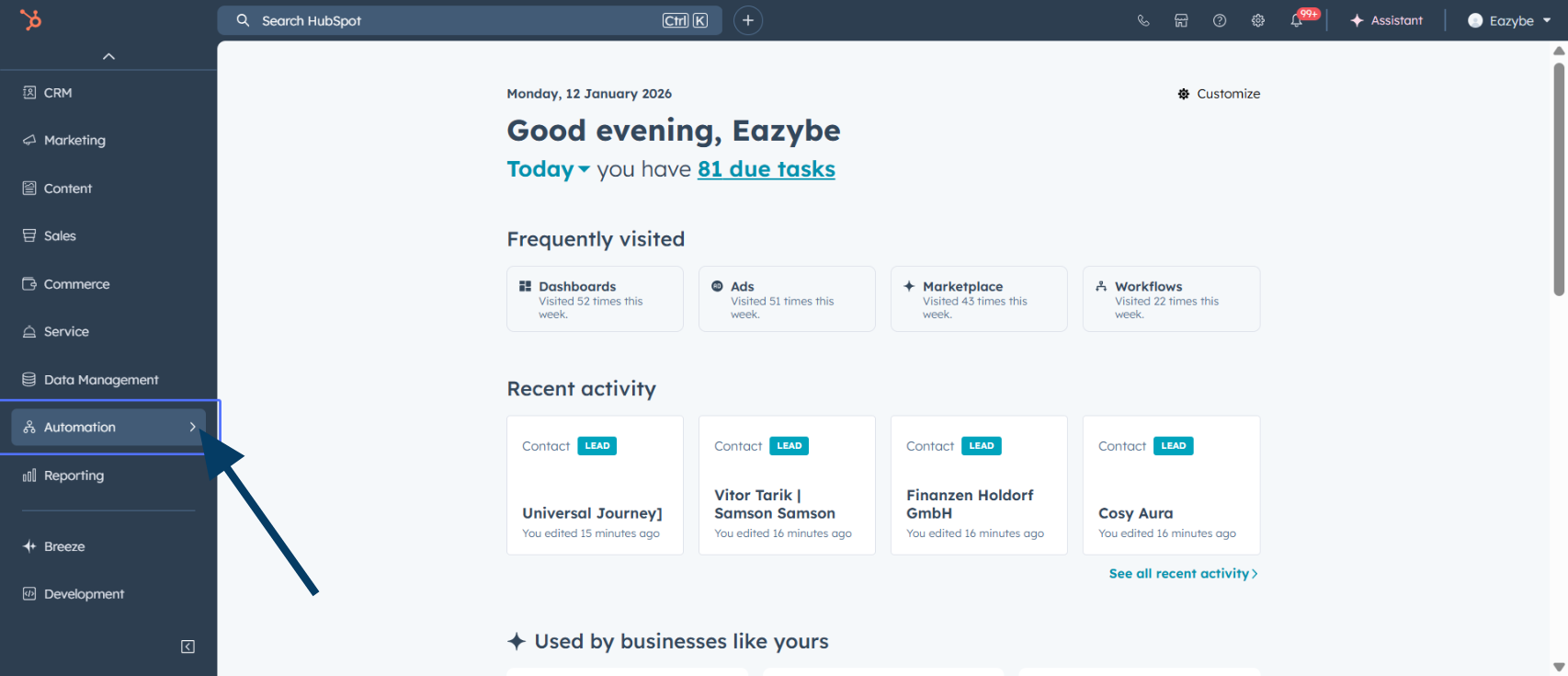
    <img src="https://mintcdn.com/eazybe/sttSA_SpGc2Das_j/images/1933597310.png?fit=max&auto=format&n=sttSA_SpGc2Das_j&q=85&s=2fb9df95c64a04b97962e163ec9df096" alt="Otomasyona gidin" width="1706" height="735" data-path="images/1933597310.png" />
  </Step>

  <Step title="İş akışlarını seçin">
    **Workflows** seçeneğini seçin.

    <img src="https://mintcdn.com/eazybe/qywAPyIJqEacfaRw/images/1933597303.png?fit=max&auto=format&n=qywAPyIJqEacfaRw&q=85&s=78faddc955df3be1c9492aba3ac715e5" alt="İş akışlarını seçin" width="1706" height="735" data-path="images/1933597303.png" />
  </Step>

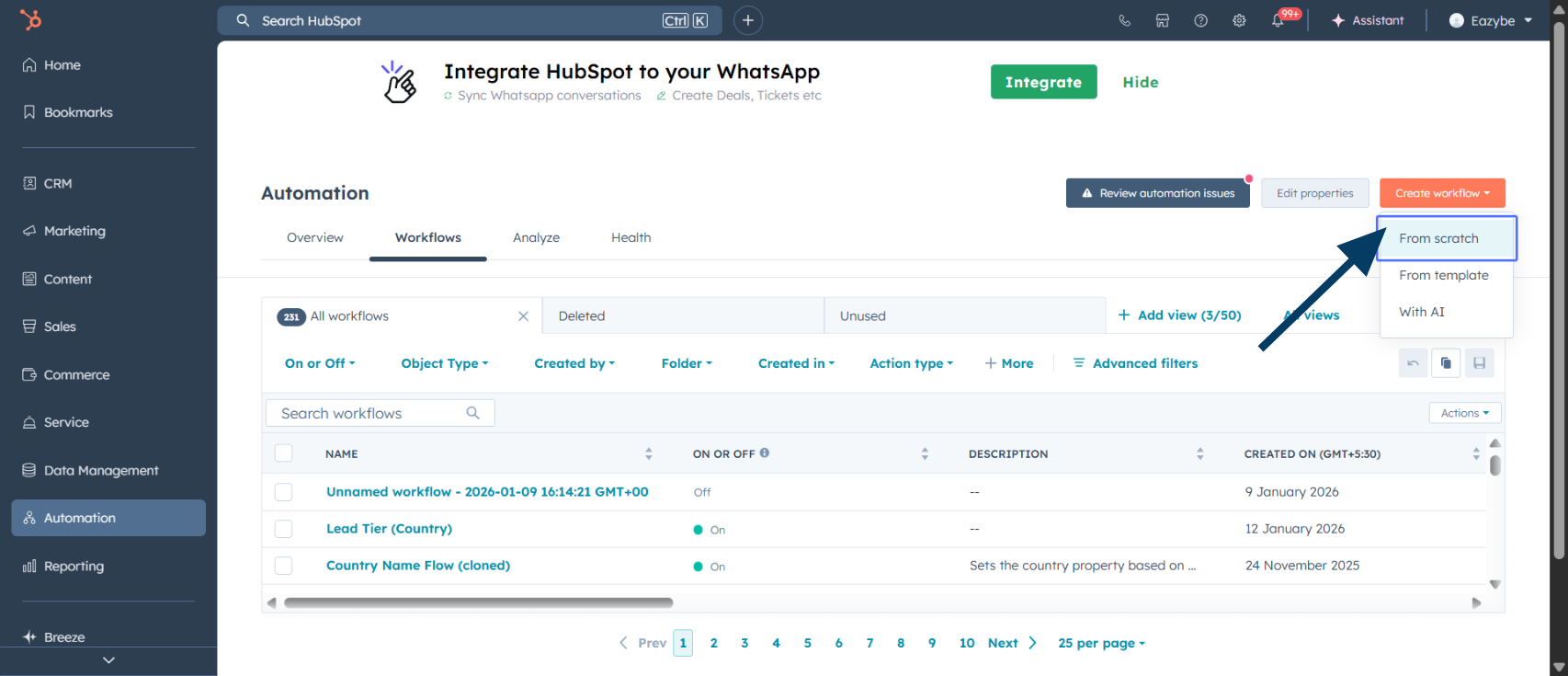
  <Step title="Yeni iş akışı oluşturun">
    **Create workflow** seçeneğine tıklayın.
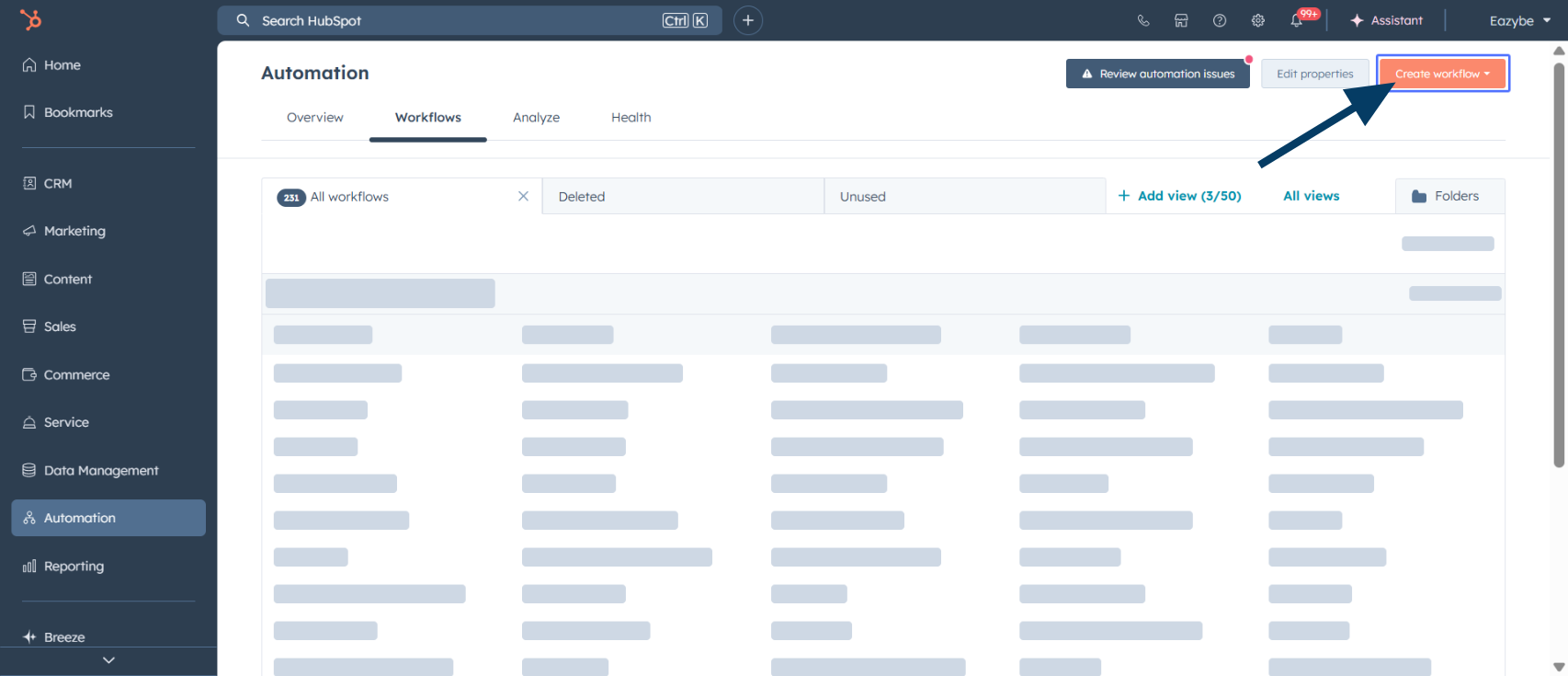
    <img src="https://mintcdn.com/eazybe/sttSA_SpGc2Das_j/images/1933597307.png?fit=max&auto=format&n=sttSA_SpGc2Das_j&q=85&s=08a51d5aab5f3da4ca428aa74e7b9cd5" alt="İş akışı oluşturun" width="1706" height="735" data-path="images/1933597307.png" />
  </Step>

  <Step title="Sıfırdan oluşturmayı seçin">
    **From scratch** seçeneğini seçin.

    <img src="https://mintcdn.com/eazybe/sttSA_SpGc2Das_j/images/1933597320.png?fit=max&auto=format&n=sttSA_SpGc2Das_j&q=85&s=9e2929a4f0d1e05e18759bbd5084beb7" alt="Sıfırdan oluşturun" width="1706" height="735" data-path="images/1933597320.png" />
  </Step>

  <Step title="Filtre ölçütlerini belirleyin">
    **Met filter criteria** ile kayıt koşullarını tanımlayın.
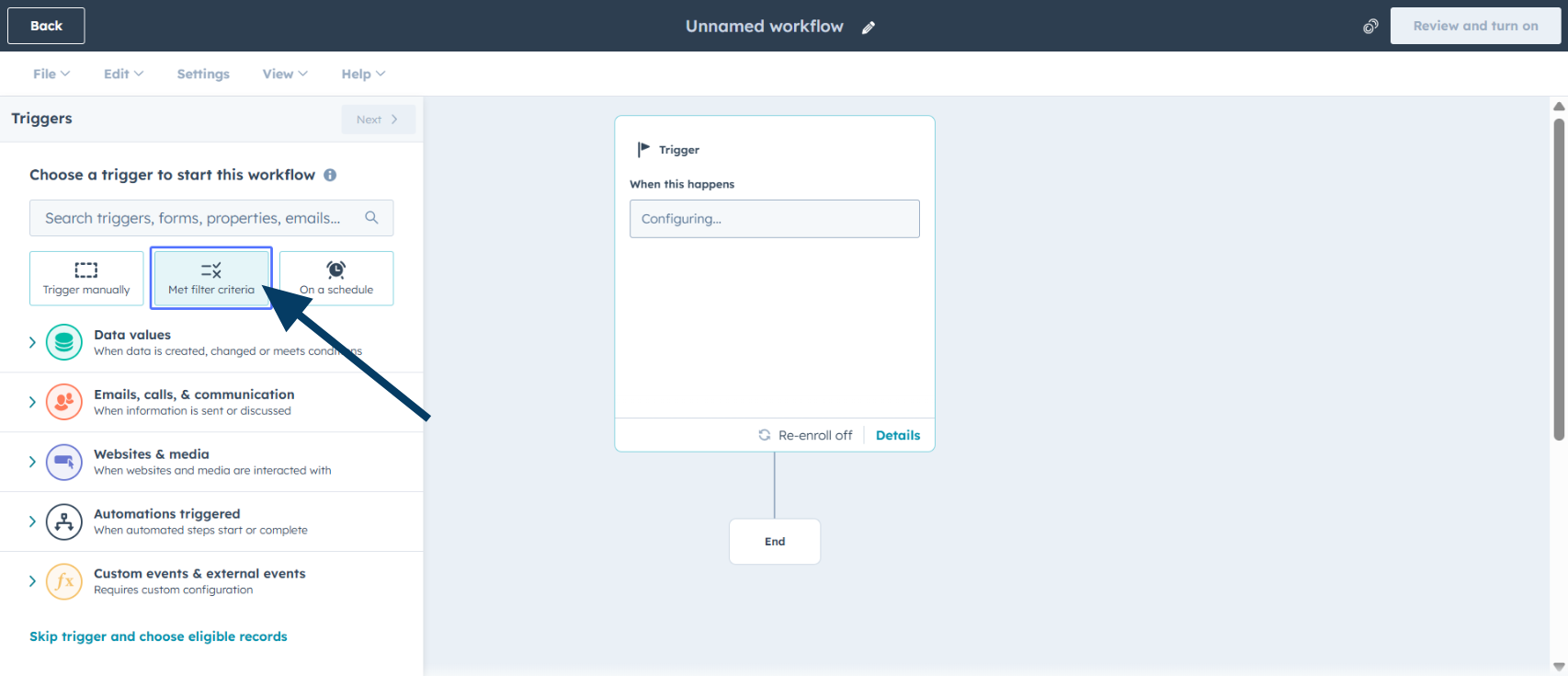
    <img src="https://mintcdn.com/eazybe/sttSA_SpGc2Das_j/images/1933597313.png?fit=max&auto=format&n=sttSA_SpGc2Das_j&q=85&s=95b06f069c4d926f90e9cdc7c88511b1" alt="Filtre ölçütleri" width="1706" height="735" data-path="images/1933597313.png" />
  </Step>

  <Step title="İş akışı nesnesini seçin">
    Nesne türü olarak **Contacts**, **Deals** veya **Leads** seçin.
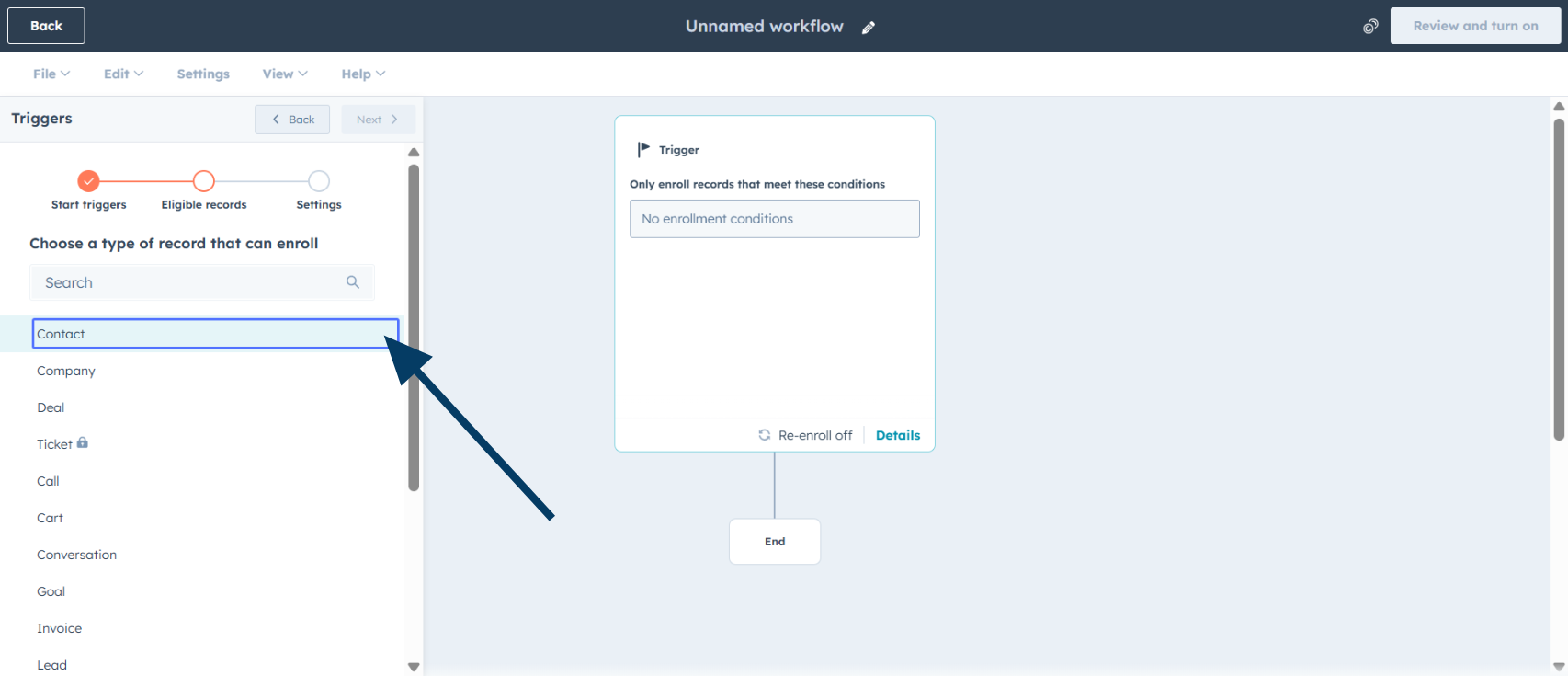
    <img src="https://mintcdn.com/eazybe/sttSA_SpGc2Das_j/images/1933597309.png?fit=max&auto=format&n=sttSA_SpGc2Das_j&q=85&s=4dae3b13770c470961fcf5bea577966a" alt="İş akışı nesnesi" width="1706" height="735" data-path="images/1933597309.png" />
  </Step>

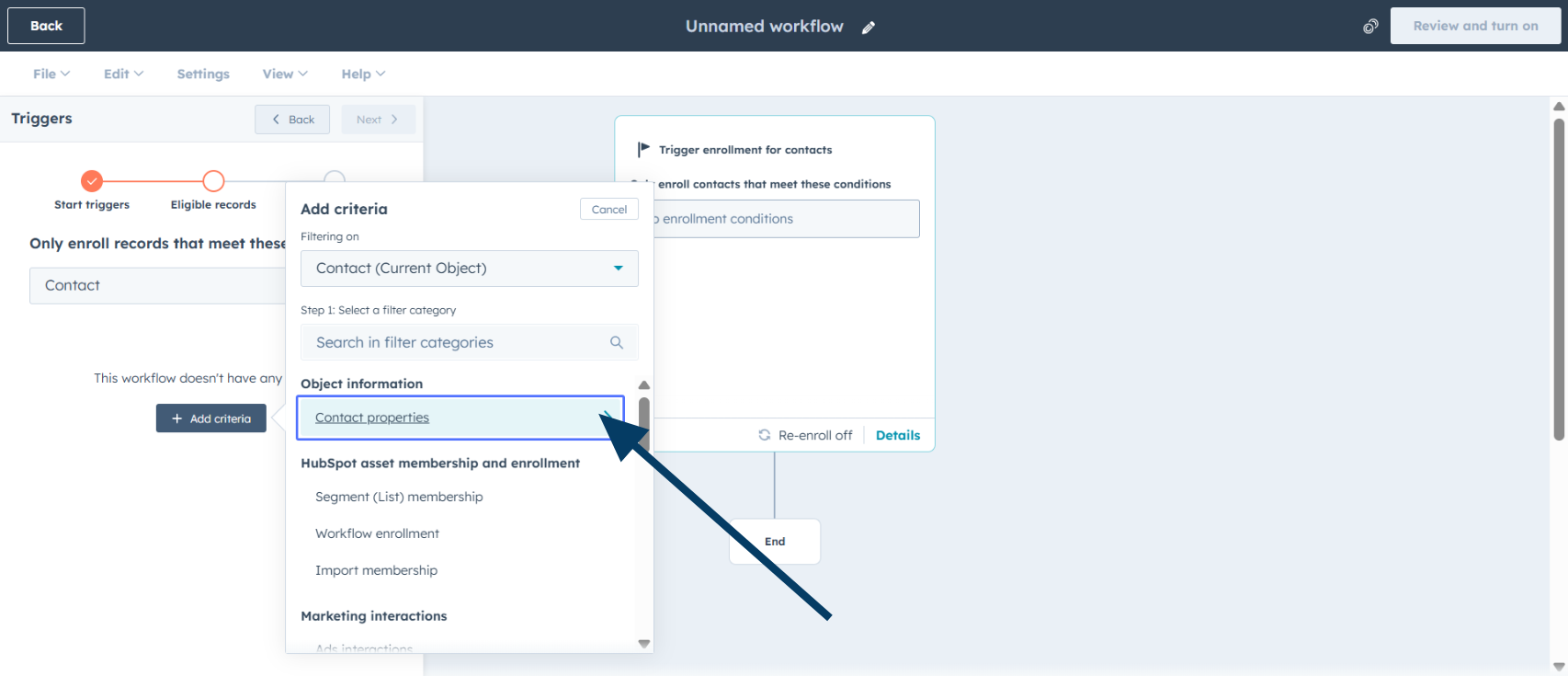
  <Step title="Kişi özelliklerine erişin">
    **Contact properties** seçeneğine tıklayın.
    <img src="https://mintcdn.com/eazybe/qywAPyIJqEacfaRw/images/1933597302.png?fit=max&auto=format&n=qywAPyIJqEacfaRw&q=85&s=b8108240e81de03bf57a479a92b00820" alt="Kişi özellikleri" width="1706" height="735" data-path="images/1933597302.png" />
  </Step>

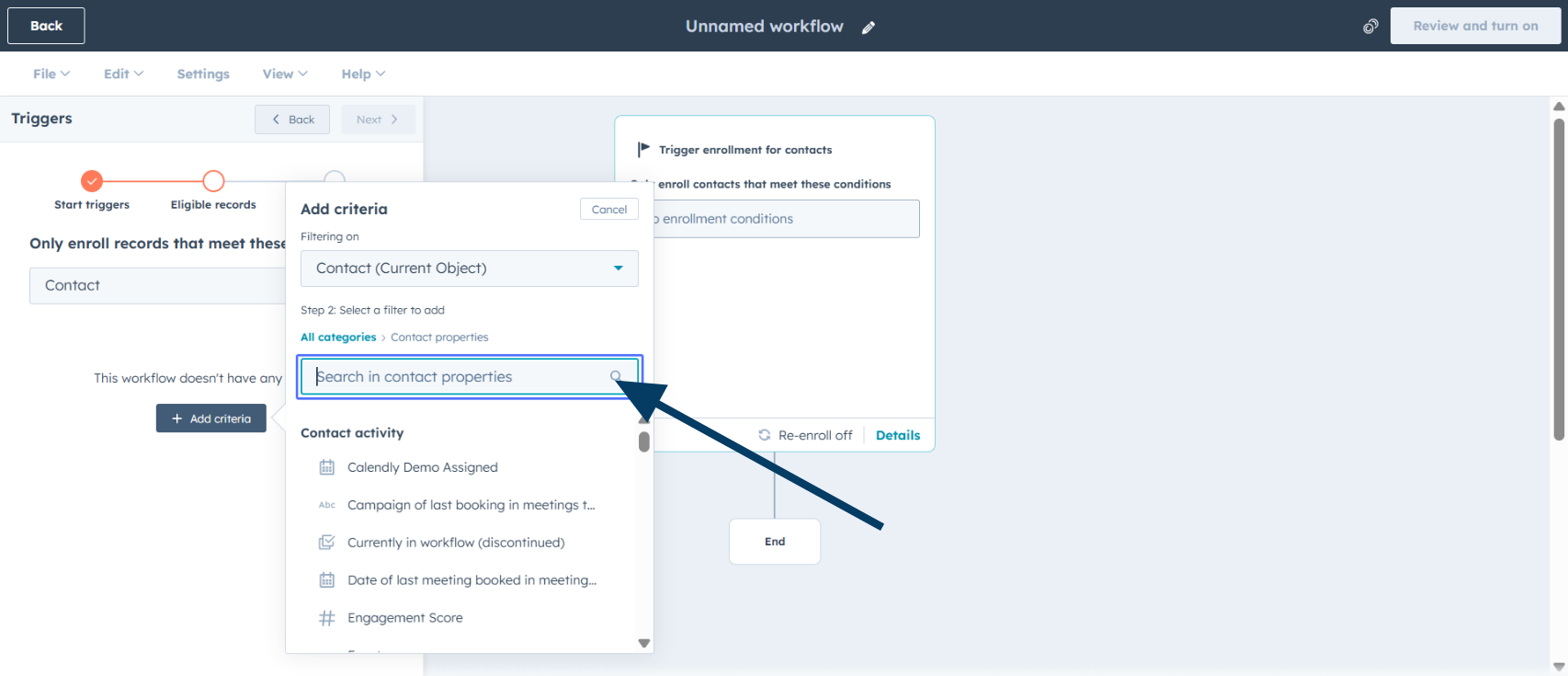
  <Step title="Bir özellik arayın">
    Tetikleyici olarak kullanacağınız özelliği arayın.
    <img src="https://mintcdn.com/eazybe/sttSA_SpGc2Das_j/images/1933597316.png?fit=max&auto=format&n=sttSA_SpGc2Das_j&q=85&s=f287aab0eadce3c67fca8ca03a76062f" alt="Özellik arayın" width="1706" height="735" data-path="images/1933597316.png" />
  </Step>

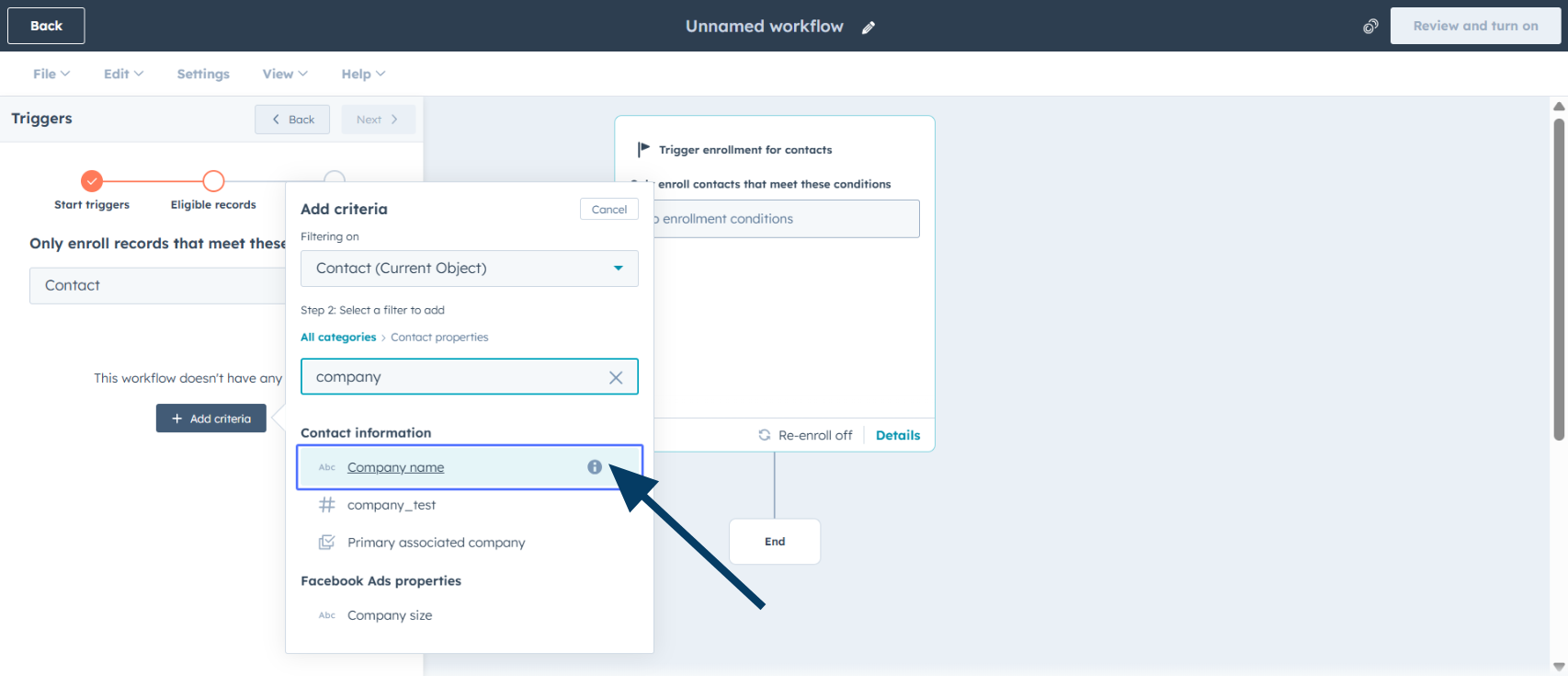
  <Step title="Özellik adını seçin">
    İstediğiniz özelliği seçin; örneğin **Company name**.
    <img src="https://mintcdn.com/eazybe/qywAPyIJqEacfaRw/images/1933597306.png?fit=max&auto=format&n=qywAPyIJqEacfaRw&q=85&s=e9514c8d30fc876bfd64ac5520c40d0b" alt="Özellik seçin" width="1706" height="735" data-path="images/1933597306.png" />

    <Info>
      Yaşam döngüsü aşaması, lead durumu veya özel bir kişi özelliği kullanabilirsiniz.
    </Info>
  </Step>

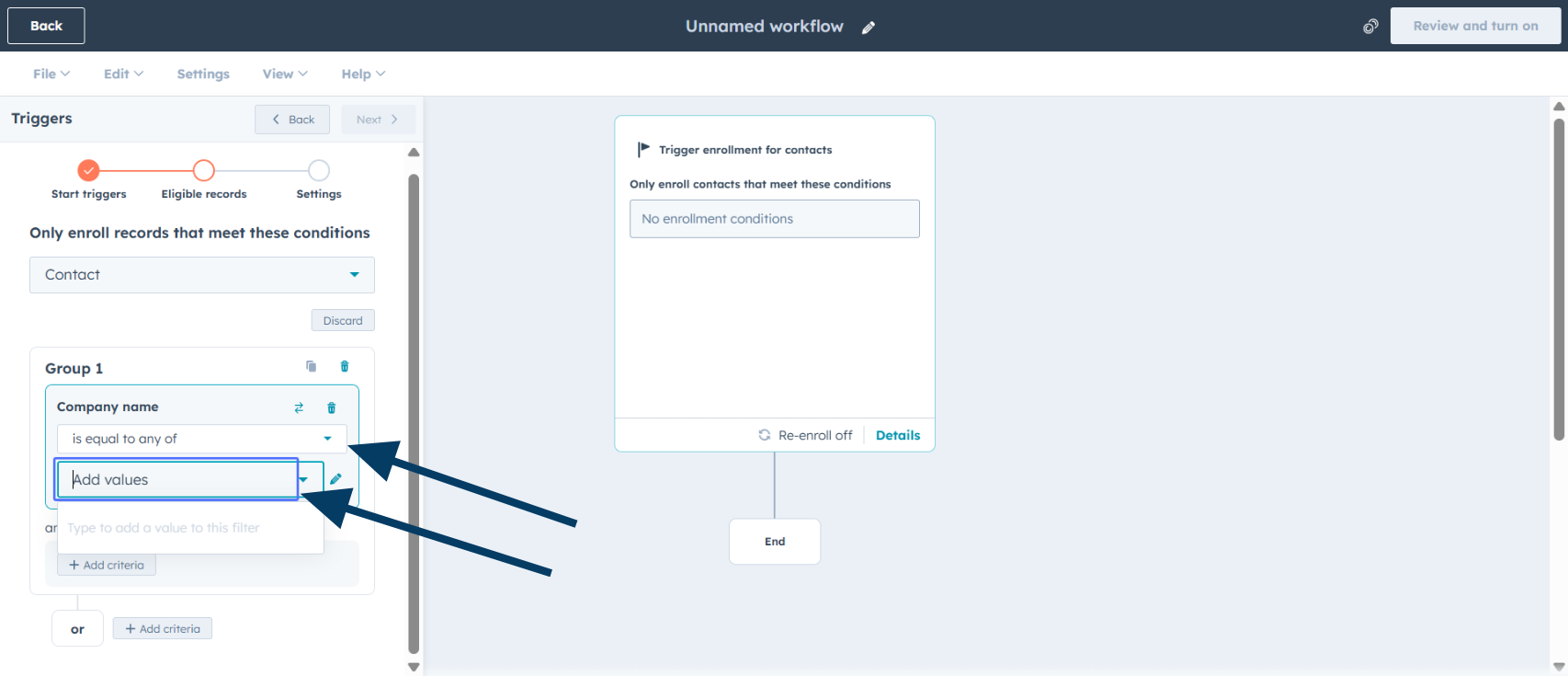
  <Step title="Koşulları yapılandırın">
    **is equal to any of** gibi bir koşul seçip değerleri **Add values** alanına ekleyin.
    <img src="https://mintcdn.com/eazybe/qywAPyIJqEacfaRw/images/1933597299.png?fit=max&auto=format&n=qywAPyIJqEacfaRw&q=85&s=1f117a647a19f5cbb7db7c41aaf0d98e" alt="Koşulları yapılandırın" width="1706" height="735" data-path="images/1933597299.png" />
  </Step>

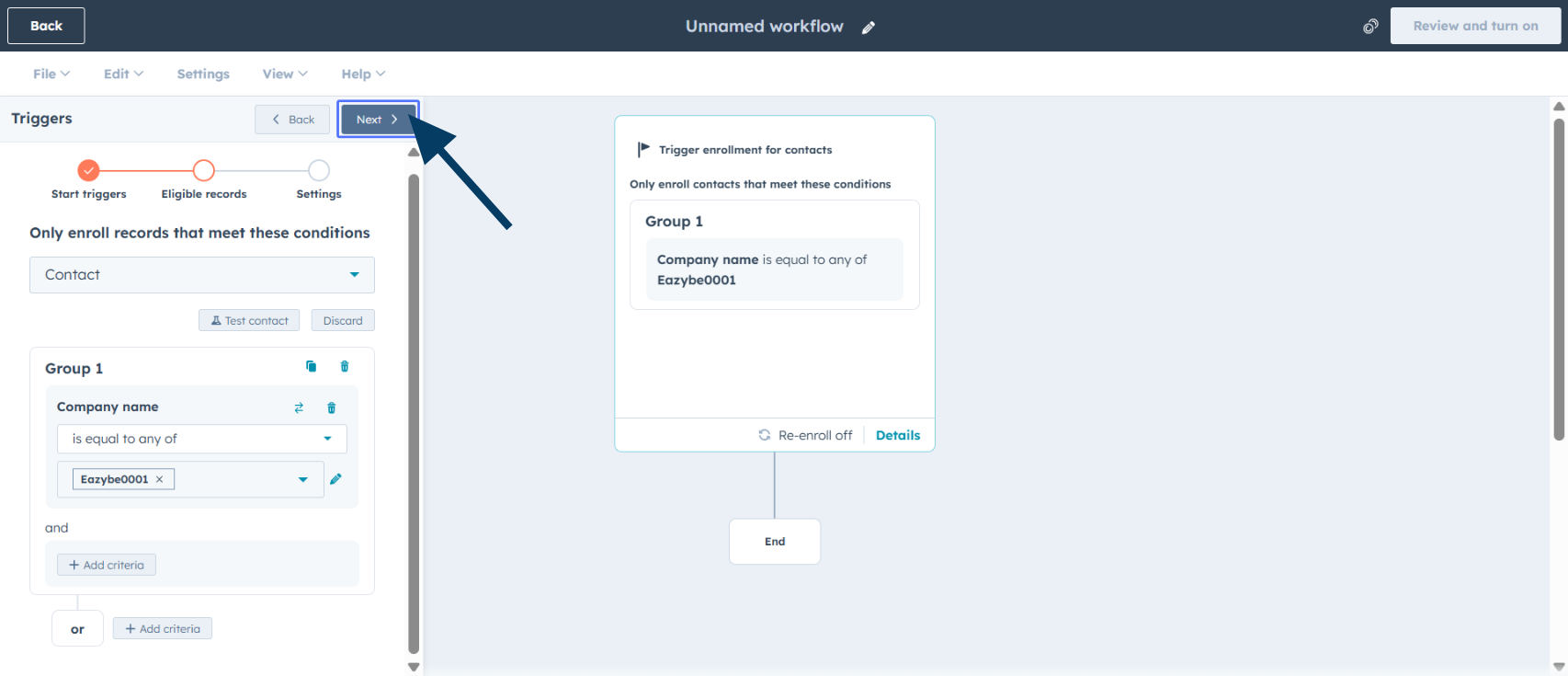
  <Step title="Sonraki adıma geçin">
    **Next** seçeneğine tıklayın.

    <img src="https://mintcdn.com/eazybe/qywAPyIJqEacfaRw/images/1933597301.png?fit=max&auto=format&n=qywAPyIJqEacfaRw&q=85&s=075d97a58d47d1c2cd14250d5d12d3f4" alt="Sonraki adım" width="1706" height="735" data-path="images/1933597301.png" />
  </Step>

  <Step title="Yeniden kaydı etkinleştirin">
    Kişilerin yeniden girmesi için **Re-enroll** seçeneğini açın.
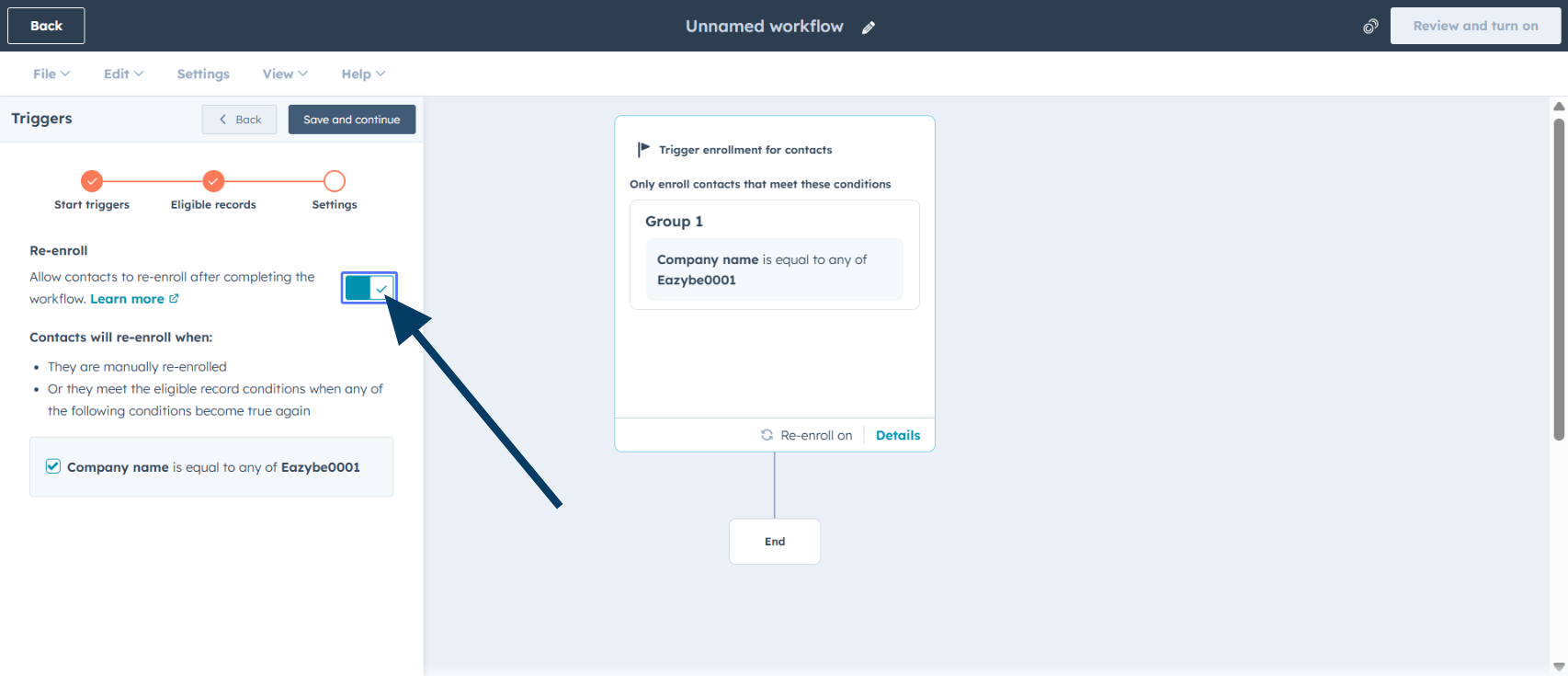
    <img src="https://mintcdn.com/eazybe/sttSA_SpGc2Das_j/images/1933597311.png?fit=max&auto=format&n=sttSA_SpGc2Das_j&q=85&s=ee9e0a9c7fd5752b54a2a1fb9960d1bc" alt="Yeniden kayıt" width="1706" height="735" data-path="images/1933597311.png" />

    <Warning>
      Yinelenen mesajları önlemek için bu ayarı dikkatle yapılandırın.
    </Warning>
  </Step>

  <Step title="Kayıt ayarlarını kaydedin">
    **Save and continue** seçeneğine tıklayın.
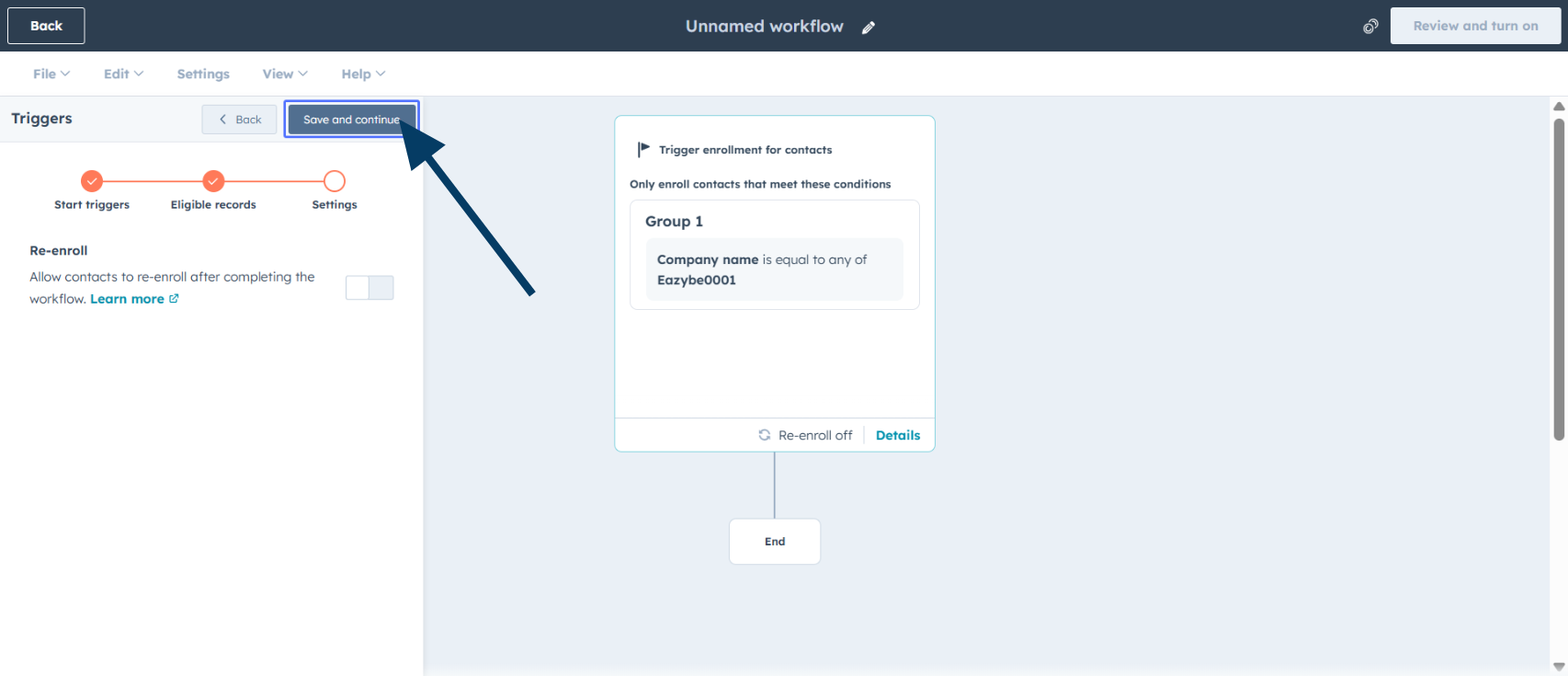
    <img src="https://mintcdn.com/eazybe/qywAPyIJqEacfaRw/images/1933597304.png?fit=max&auto=format&n=qywAPyIJqEacfaRw&q=85&s=c38c685ac2df9a4ccb4f0a0fa813cf94" alt="Kayıt ayarlarını kaydedin" width="1706" height="735" data-path="images/1933597304.png" />
  </Step>

  <Step title="WhatsApp entegrasyonunu ekleyin">
    **WhatsApp Integration by Eazybe** seçeneğini seçin.
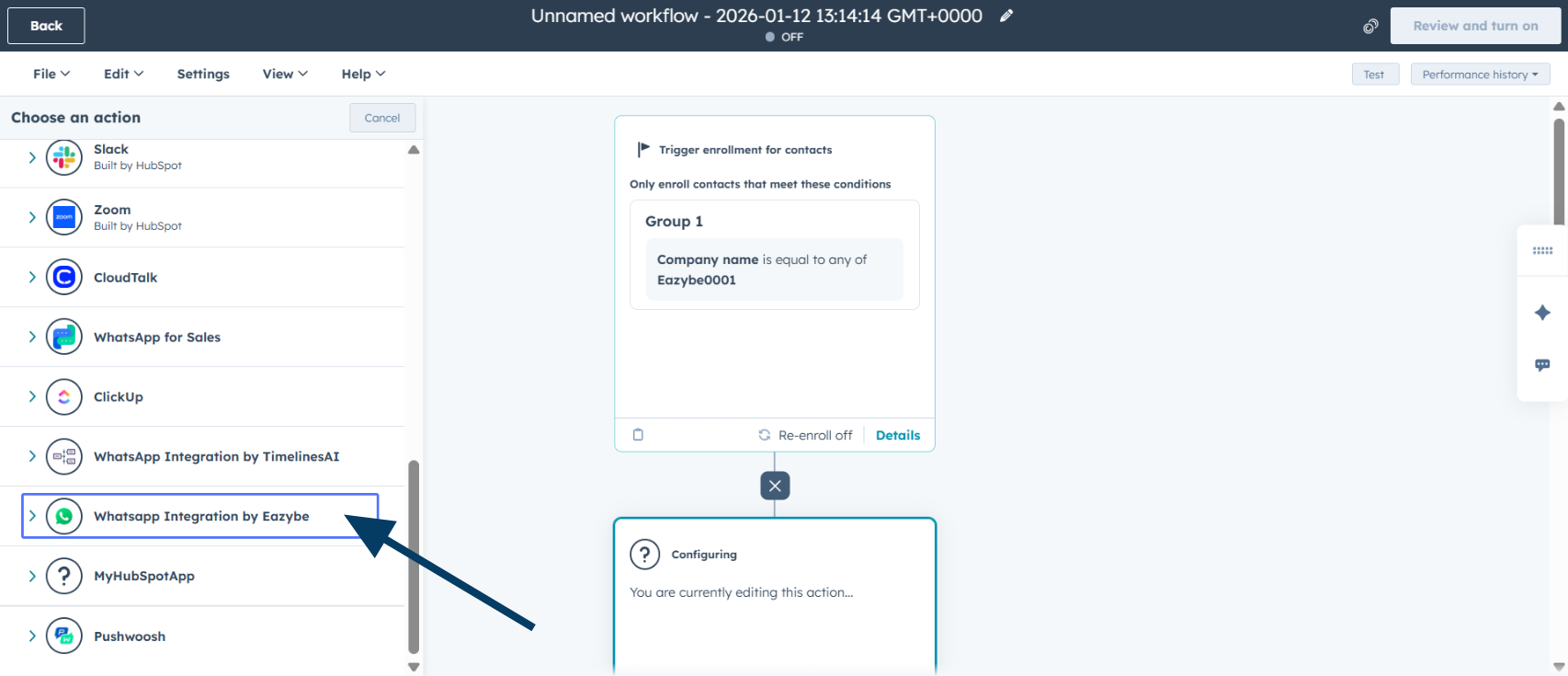
    <img src="https://mintcdn.com/eazybe/sttSA_SpGc2Das_j/images/1933597323.png?fit=max&auto=format&n=sttSA_SpGc2Das_j&q=85&s=89a16153763b80e659d08f0e454a1c2d" alt="WhatsApp entegrasyonu" width="1706" height="735" data-path="images/1933597323.png" />
  </Step>

  <Step title="Şablon eylemini seçin">
    Onaylı bir şablon seçmek için **Send WhatsApp & Wait for Reply** eylemine tıklayın.
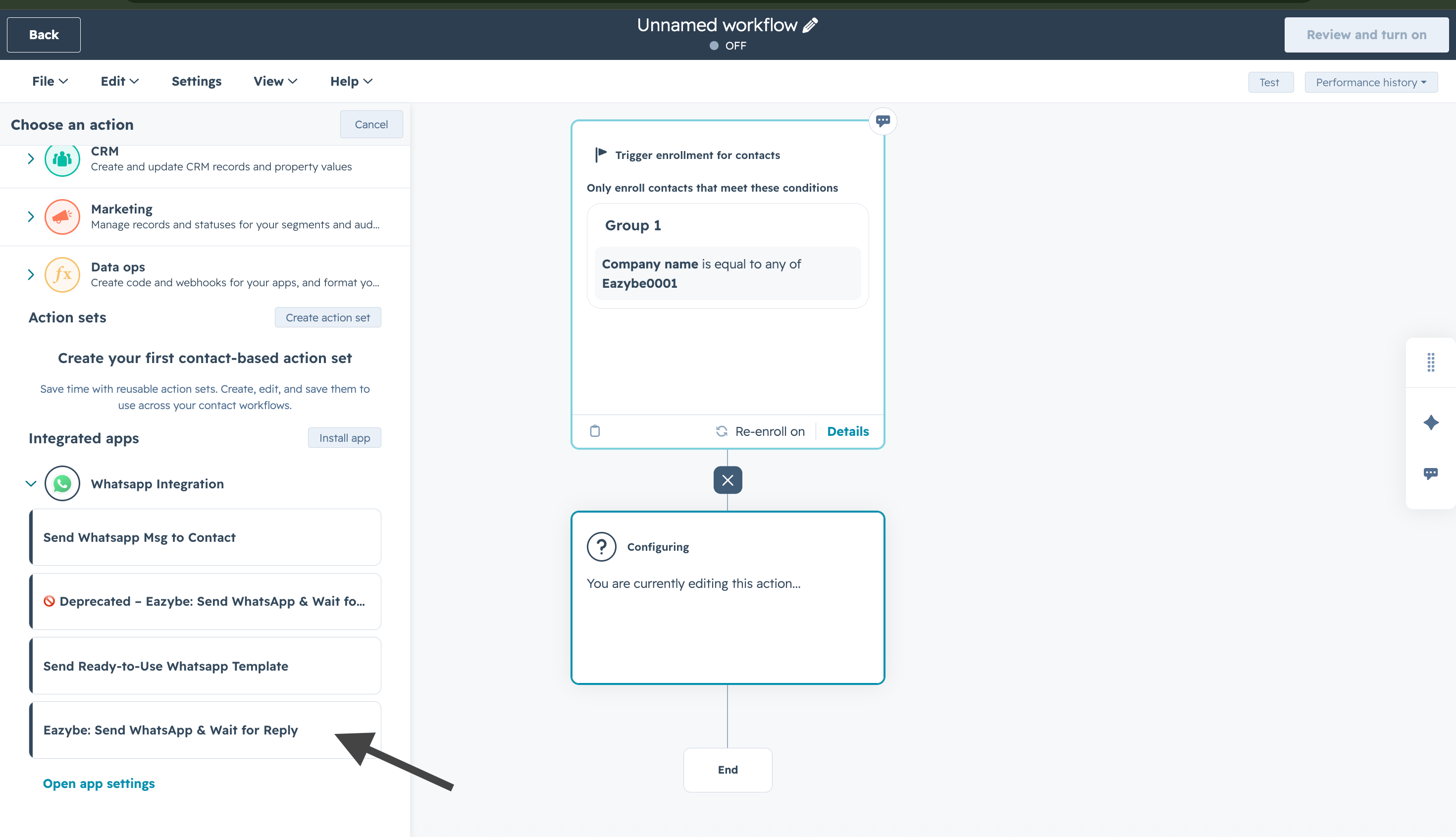
    <img src="https://mintcdn.com/eazybe/NZtXvr5CRt0MZpuu/images/hubspot-wait-reply-select-action.png?fit=max&auto=format&n=NZtXvr5CRt0MZpuu&q=85&s=6da9c894203452bfd4d4bb3aa2a7a902" alt="WhatsApp gönder ve yanıt bekle" width="2940" height="1690" data-path="images/hubspot-wait-reply-select-action.png" />
  </Step>

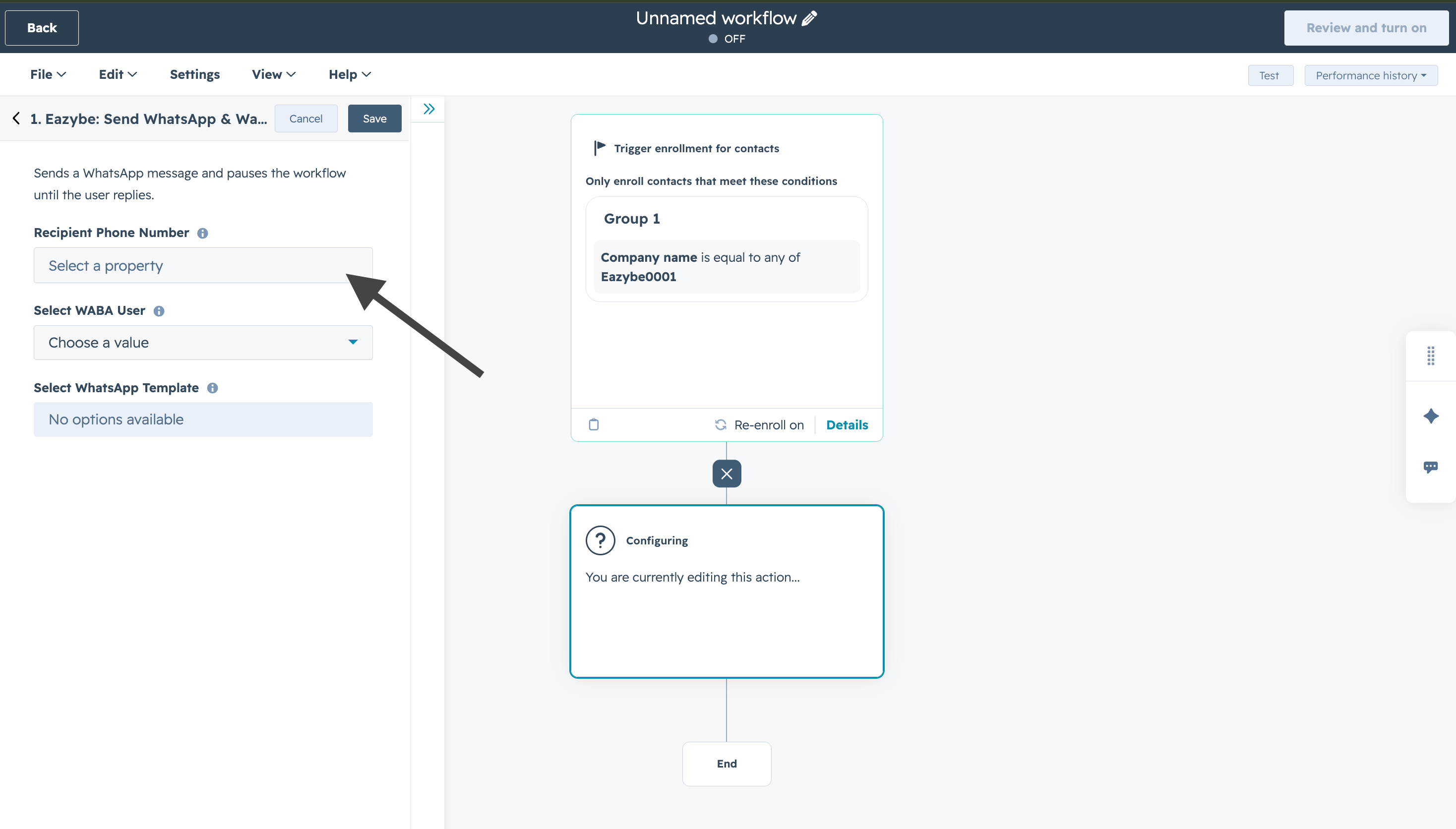
  <Step title="Alıcı telefon numarası">
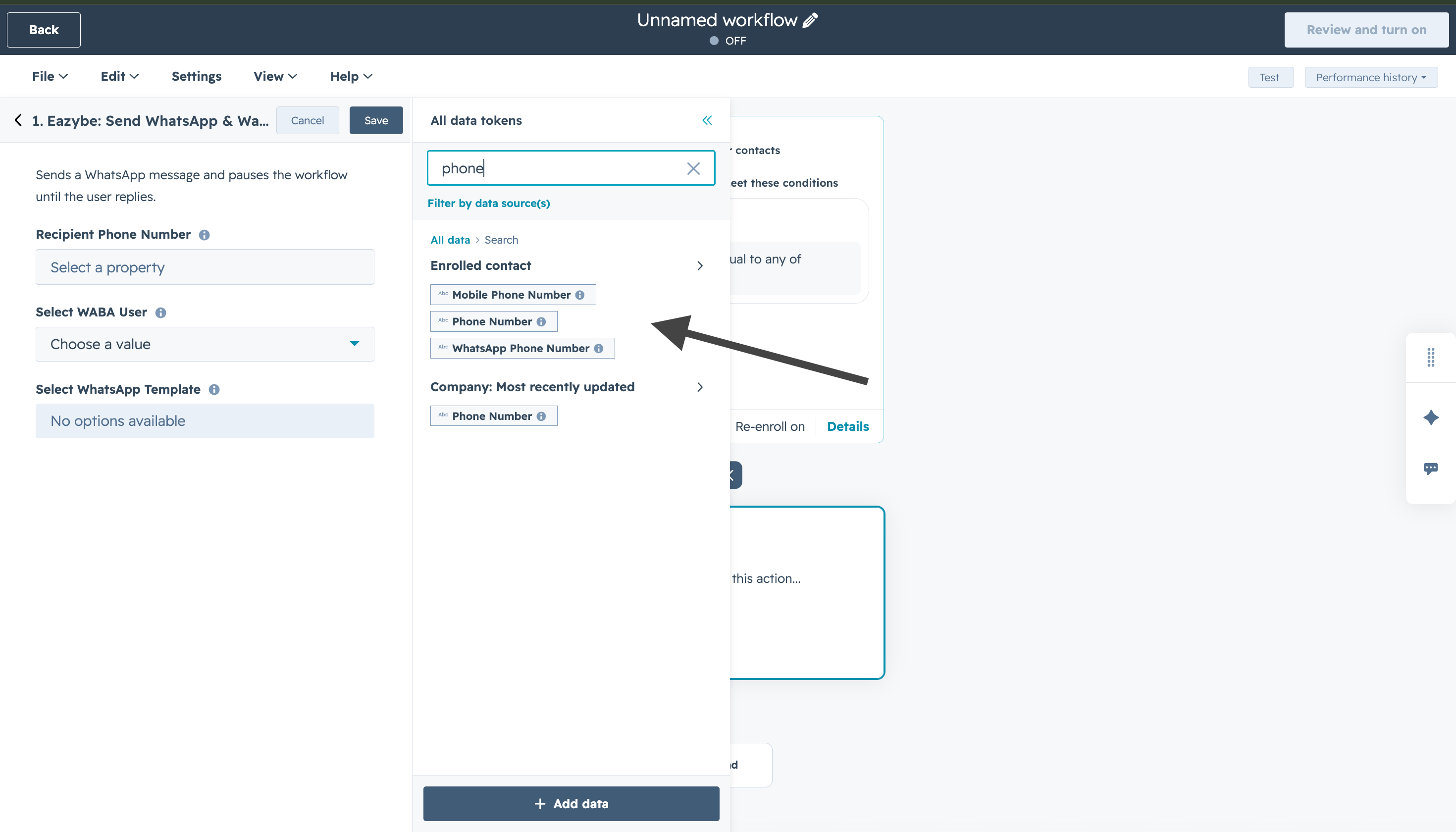
    **Recipient Phone Number** alanında **Mobile phone number**, **Phone number** veya **WhatsApp phone number** özelliğini seçin.
    <img src="https://mintcdn.com/eazybe/NZtXvr5CRt0MZpuu/images/hubspot-wait-reply-recipient-phone-number.png?fit=max&auto=format&n=NZtXvr5CRt0MZpuu&q=85&s=4e948623a43511a32cc2ffbeef157907" alt="Alıcı telefon numarası" width="2936" height="1672" data-path="images/hubspot-wait-reply-recipient-phone-number.png" />

    <Tip>
      Numaraları +1234567890 gibi uluslararası biçimde kaydedin.
    </Tip>
  </Step>

  <Step title="Telefon numarası özelliğini seçin">
    Kullanılabilir telefon özelliklerinden birini seçin.
    <img src="https://mintcdn.com/eazybe/NZtXvr5CRt0MZpuu/images/hubspot-wait-reply-select-phone-property.png?fit=max&auto=format&n=NZtXvr5CRt0MZpuu&q=85&s=5ff9d179918017ac6ff360d0e669c5ba" alt="Telefon özelliği seçin" width="2940" height="1680" data-path="images/hubspot-wait-reply-select-phone-property.png" />
  </Step>

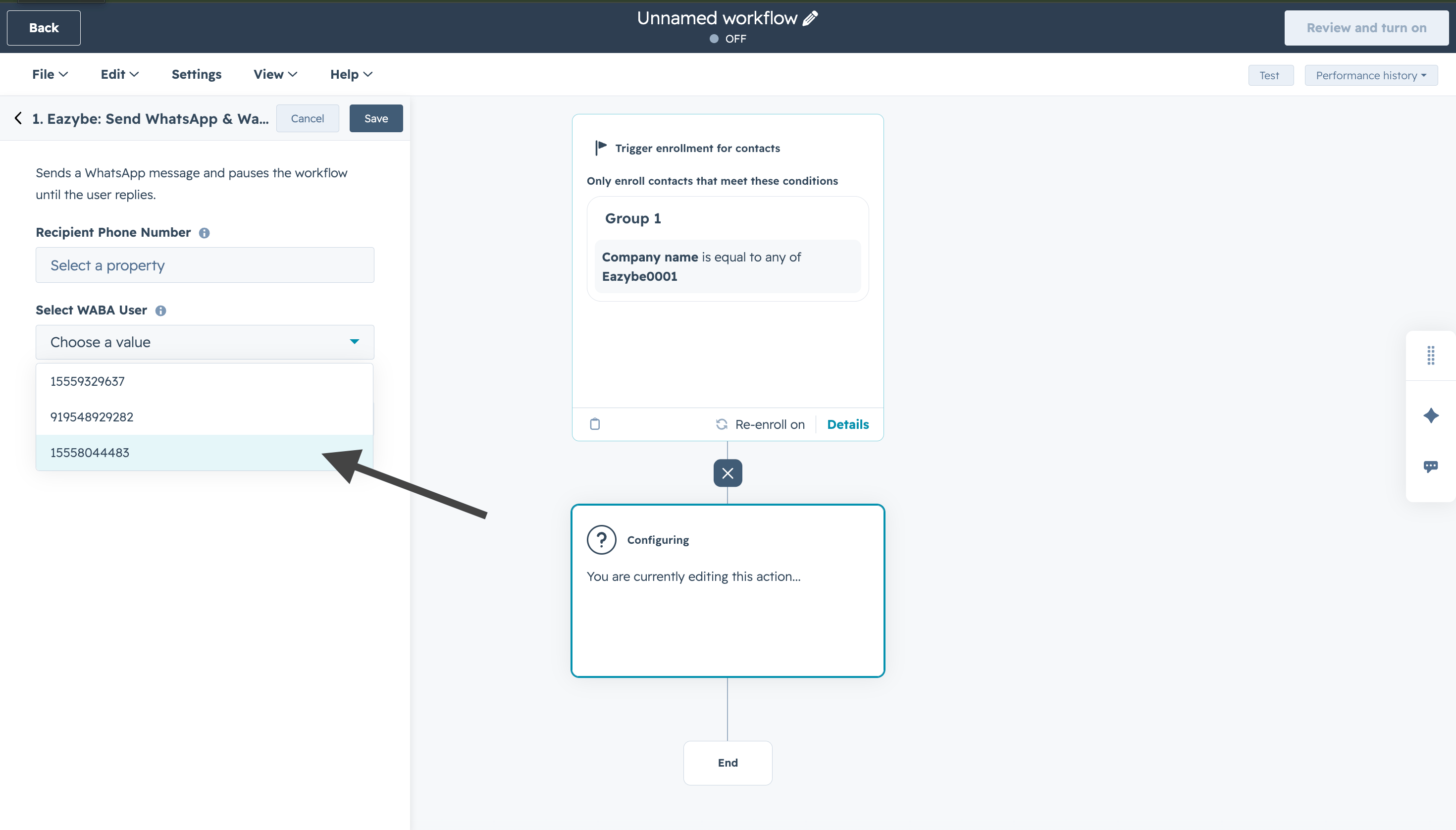
  <Step title="WABA numarasını seçin">
    Kullanılabilir seçeneklerden bir WABA kullanıcısı seçin.
    <img src="https://mintcdn.com/eazybe/NZtXvr5CRt0MZpuu/images/hubspot-wait-reply-choose-whatsapp-template.png?fit=max&auto=format&n=NZtXvr5CRt0MZpuu&q=85&s=c72b0b28488e3ab5d05c4bff9d9523ec" alt="WABA numarası seçin" width="2940" height="1676" data-path="images/hubspot-wait-reply-choose-whatsapp-template.png" />
  </Step>

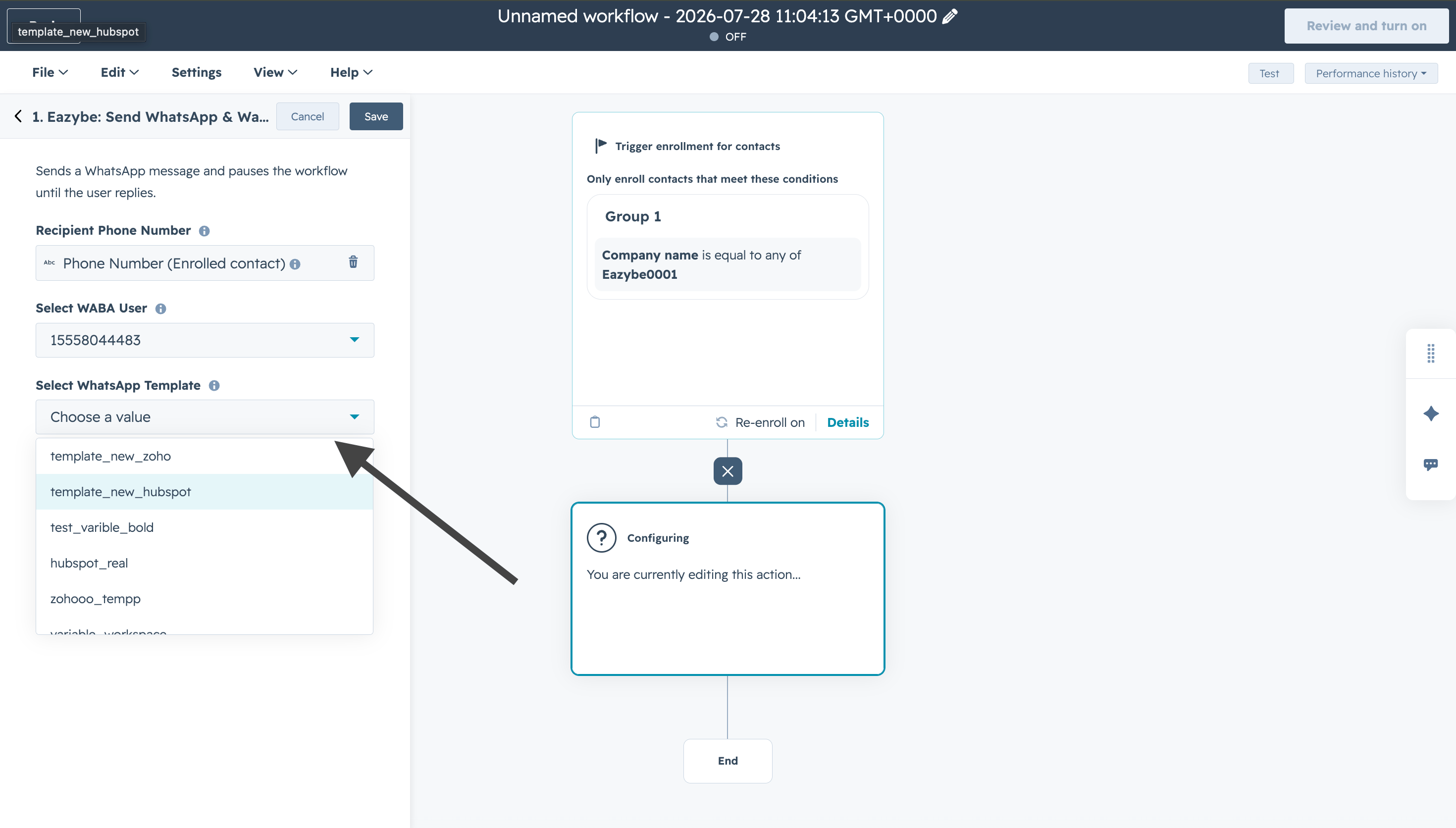
  <Step title="Düğmeli şablonu seçin">
    Koşullu dal oluşturmak için onaylı bir düğmeli şablon seçin.
    <img src="https://mintcdn.com/eazybe/NZtXvr5CRt0MZpuu/images/hubspot-wait-reply-select-whatsapp-template.png?fit=max&auto=format&n=NZtXvr5CRt0MZpuu&q=85&s=a48d48e60335bfeca4eed31fb86250d1" alt="Düğmeli şablon seçin" width="2940" height="1672" data-path="images/hubspot-wait-reply-select-whatsapp-template.png" />
  </Step>

  <Step title="Şablon seçimini kaydedin">
    Seçimi onaylamak için **Save** seçeneğine tıklayın.
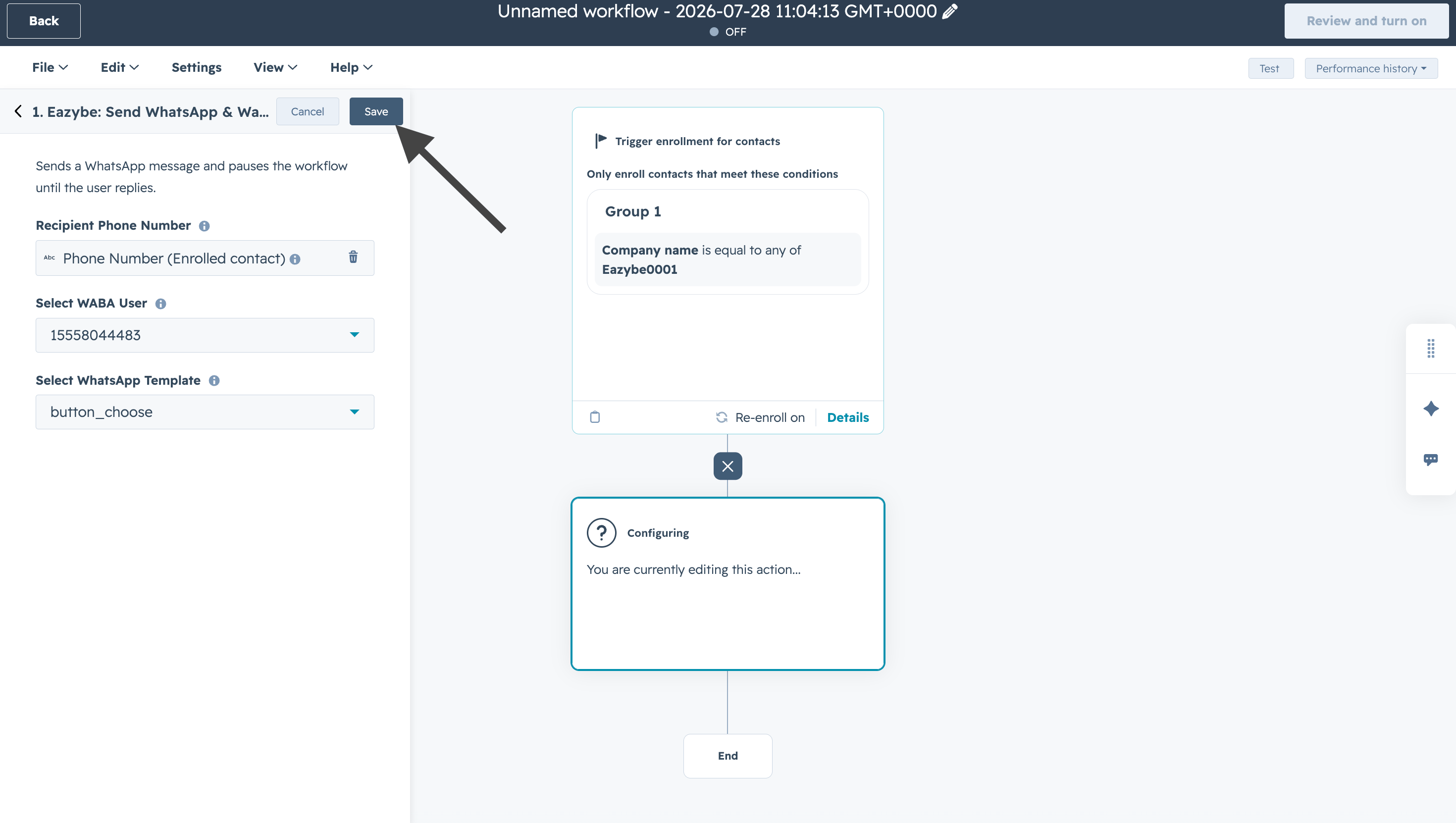
    <img src="https://mintcdn.com/eazybe/NZtXvr5CRt0MZpuu/images/hubspot-wait-reply-save-template-selection.png?fit=max&auto=format&n=NZtXvr5CRt0MZpuu&q=85&s=9840ed9c860a57f444403969f4dae373" alt="Şablon seçimini kaydedin" width="2940" height="1662" data-path="images/hubspot-wait-reply-save-template-selection.png" />
  </Step>

  <Step title="Yeni dal oluşturun">
    **+** düğmesine tıklayıp yeni bir dal oluşturun.
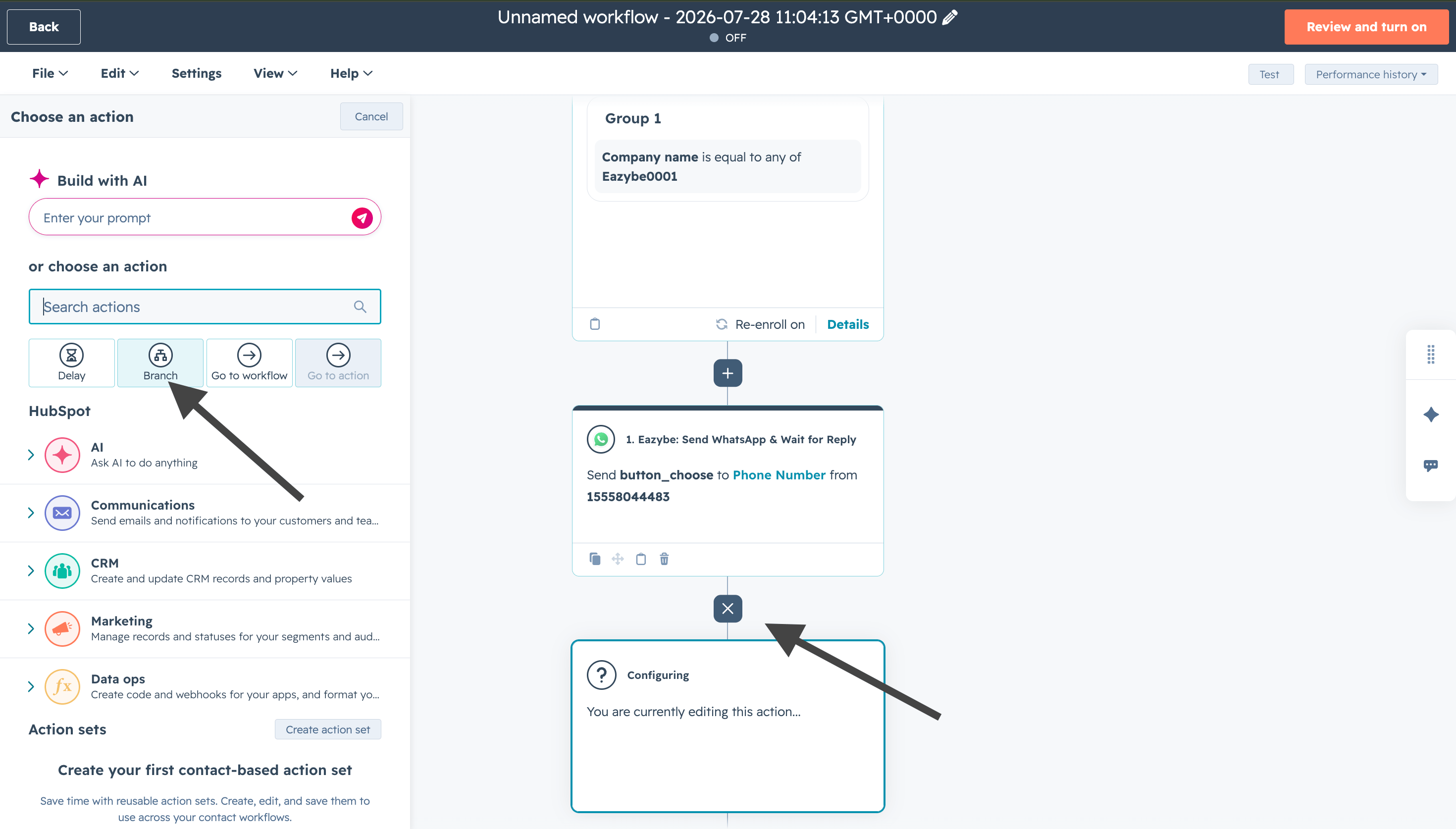
    <img src="https://mintcdn.com/eazybe/NZtXvr5CRt0MZpuu/images/hubspot-wait-reply-create-new-branch.png?fit=max&auto=format&n=NZtXvr5CRt0MZpuu&q=85&s=e132c7b621b4e4968be768a82c2f5b4f" alt="Yeni dal oluşturun" width="2940" height="1674" data-path="images/hubspot-wait-reply-create-new-branch.png" />
  </Step>

  <Step title="Dal seçin">
    **Kişileri dallara göndermek** için bir dal türü seçin.
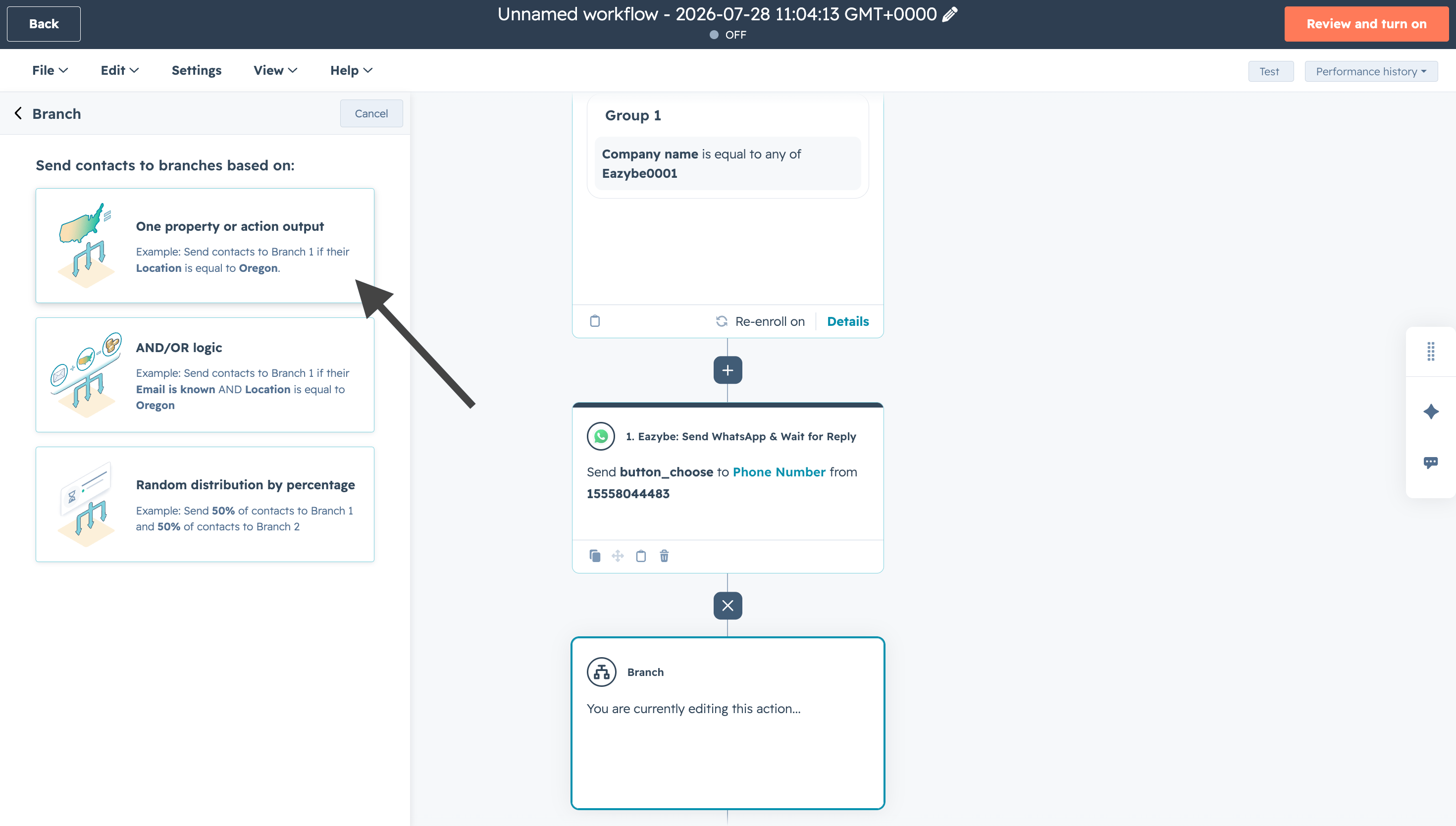
    <img src="https://mintcdn.com/eazybe/NZtXvr5CRt0MZpuu/images/hubspot-wait-reply-select-branch.png?fit=max&auto=format&n=NZtXvr5CRt0MZpuu&q=85&s=c701652005a1743618598e4721b74dd0" alt="Dal türü seçin" width="2940" height="1668" data-path="images/hubspot-wait-reply-select-branch.png" />
  </Step>

  <Step title="Özellik değerini seçin">
    **1. Eazybe: Send WhatsApp & Wait for Reply** eylemindeki **User WhatsApp Reply** özelliğini seçin.
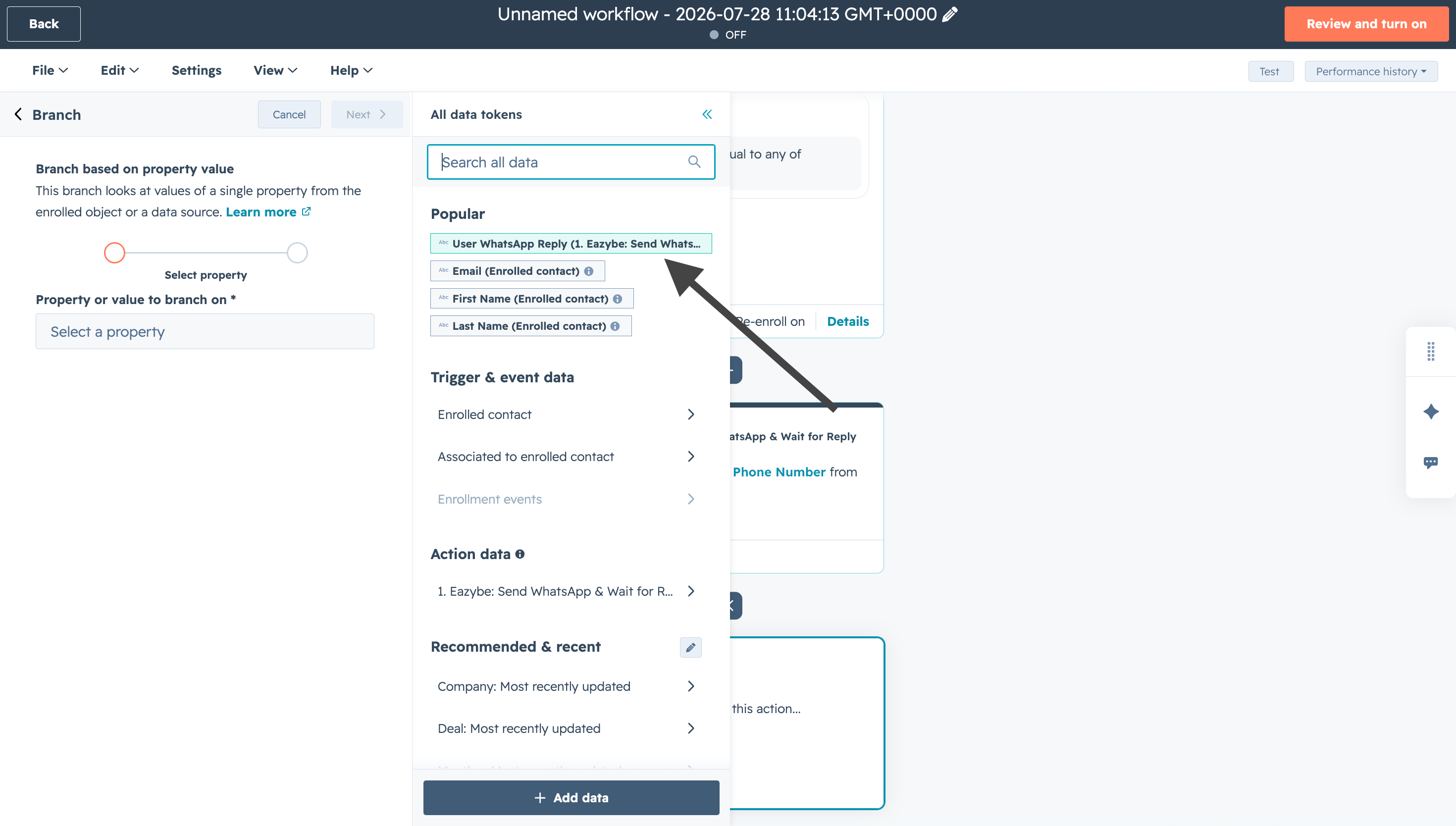
    <img src="https://mintcdn.com/eazybe/NZtXvr5CRt0MZpuu/images/hubspot-wait-reply-select-property-value.png?fit=max&auto=format&n=NZtXvr5CRt0MZpuu&q=85&s=b0388ab83f52ec7969ae8e23bf45dec3" alt="Yanıt özelliğini seçin" width="2940" height="1668" data-path="images/hubspot-wait-reply-select-property-value.png" />
  </Step>

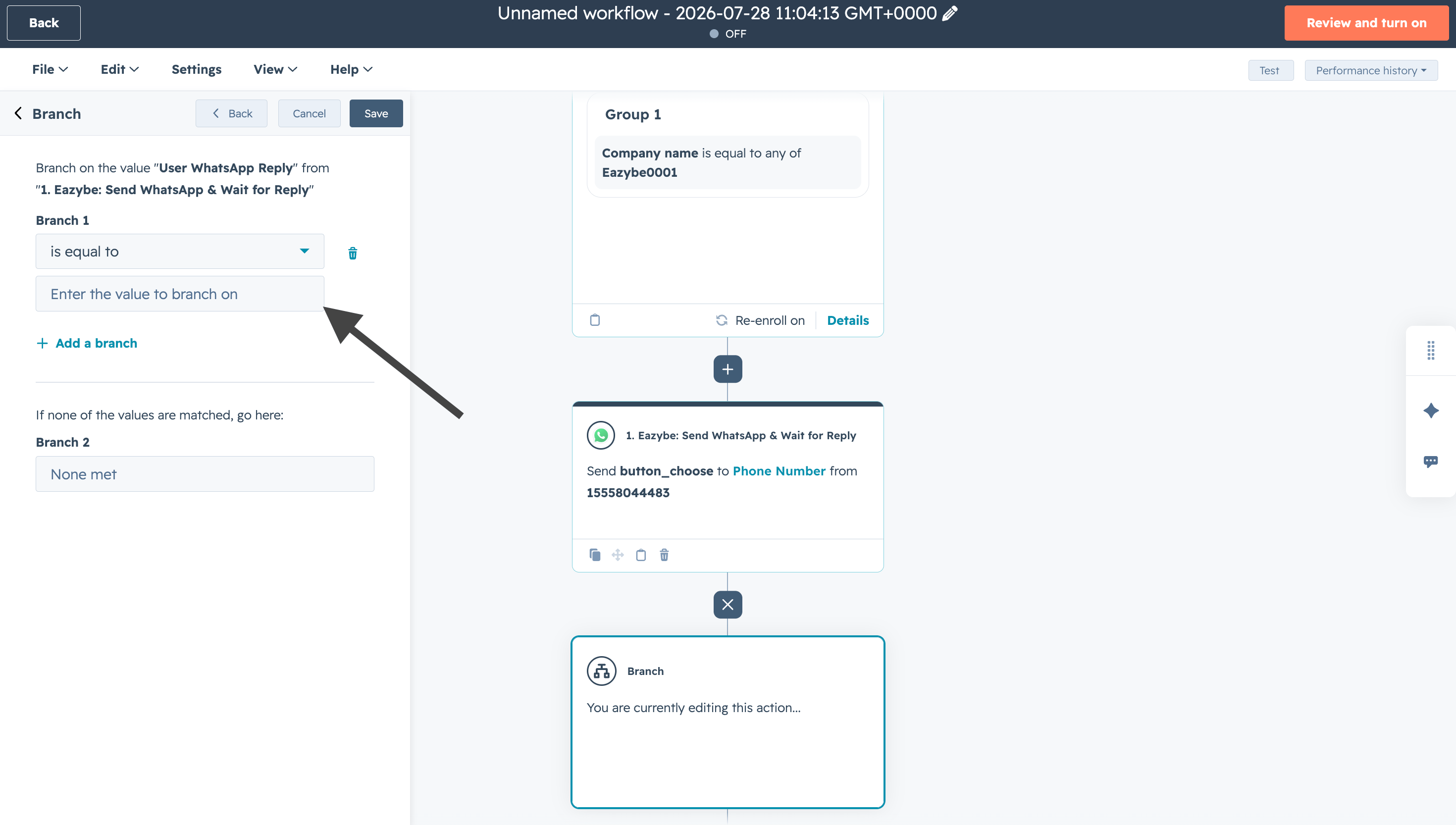
  <Step title="Dal koşulu değerini belirleyin">
    Şablon düğmesinin adına göre bir dal koşulu değeri ekleyin.
    <img src="https://mintcdn.com/eazybe/NZtXvr5CRt0MZpuu/images/hubspot-wait-reply-branch-condition-value.png?fit=max&auto=format&n=NZtXvr5CRt0MZpuu&q=85&s=4e8e2bdfc73fb6b68e73add7ed826bc0" alt="Dal koşulu değeri" width="2940" height="1666" data-path="images/hubspot-wait-reply-branch-condition-value.png" />
  </Step>

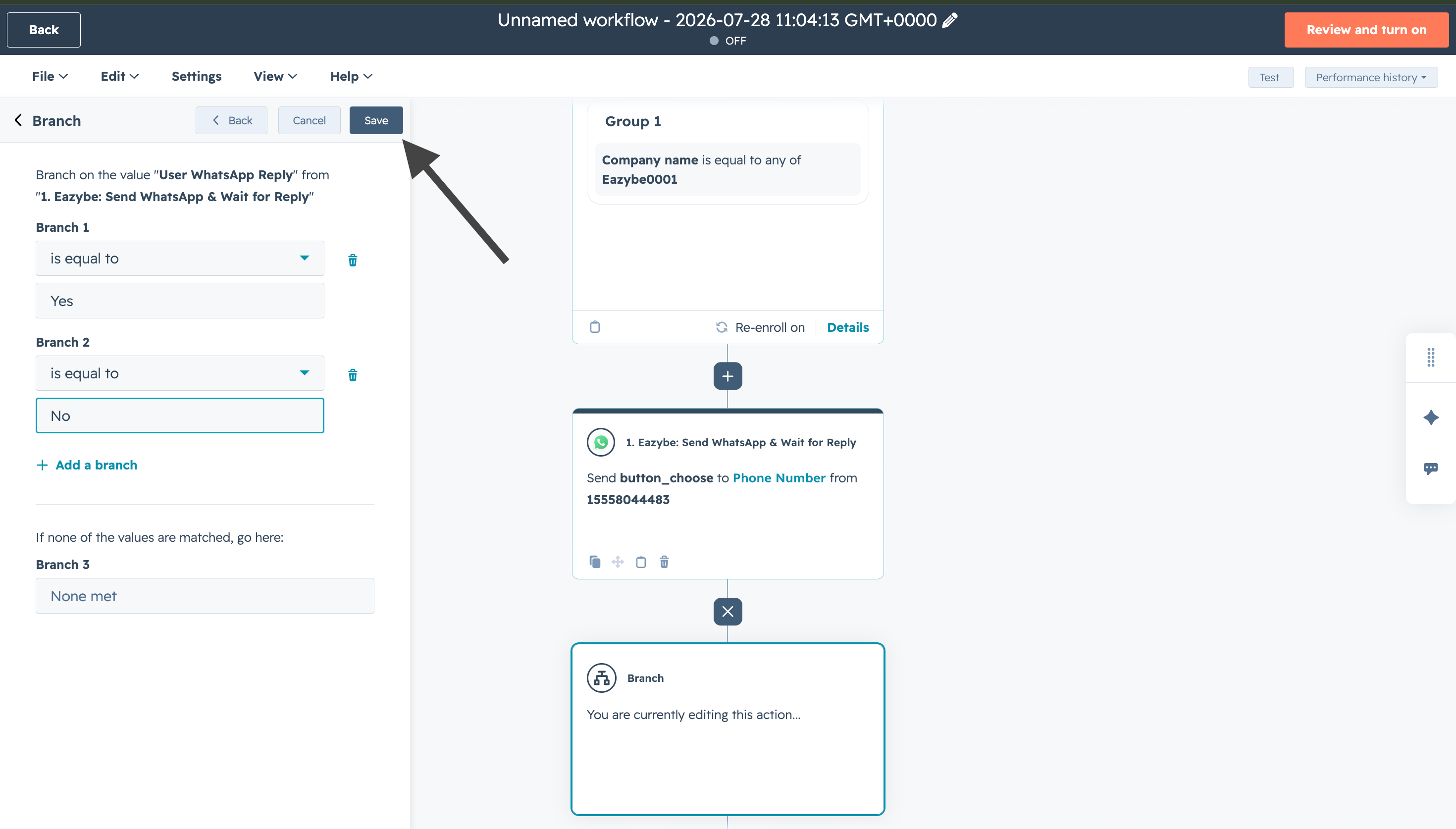
  <Step title="Dal değerlerini kaydedin">
    Değerleri ekledikten sonra **Save** seçeneğine tıklayın.
    <img src="https://mintcdn.com/eazybe/NZtXvr5CRt0MZpuu/images/hubspot-wait-reply-save-branch-values.png?fit=max&auto=format&n=NZtXvr5CRt0MZpuu&q=85&s=16dbb79da88573e327ef4f3fc6d012c7" alt="Dal değerlerini kaydedin" width="2940" height="1674" data-path="images/hubspot-wait-reply-save-branch-values.png" />
  </Step>

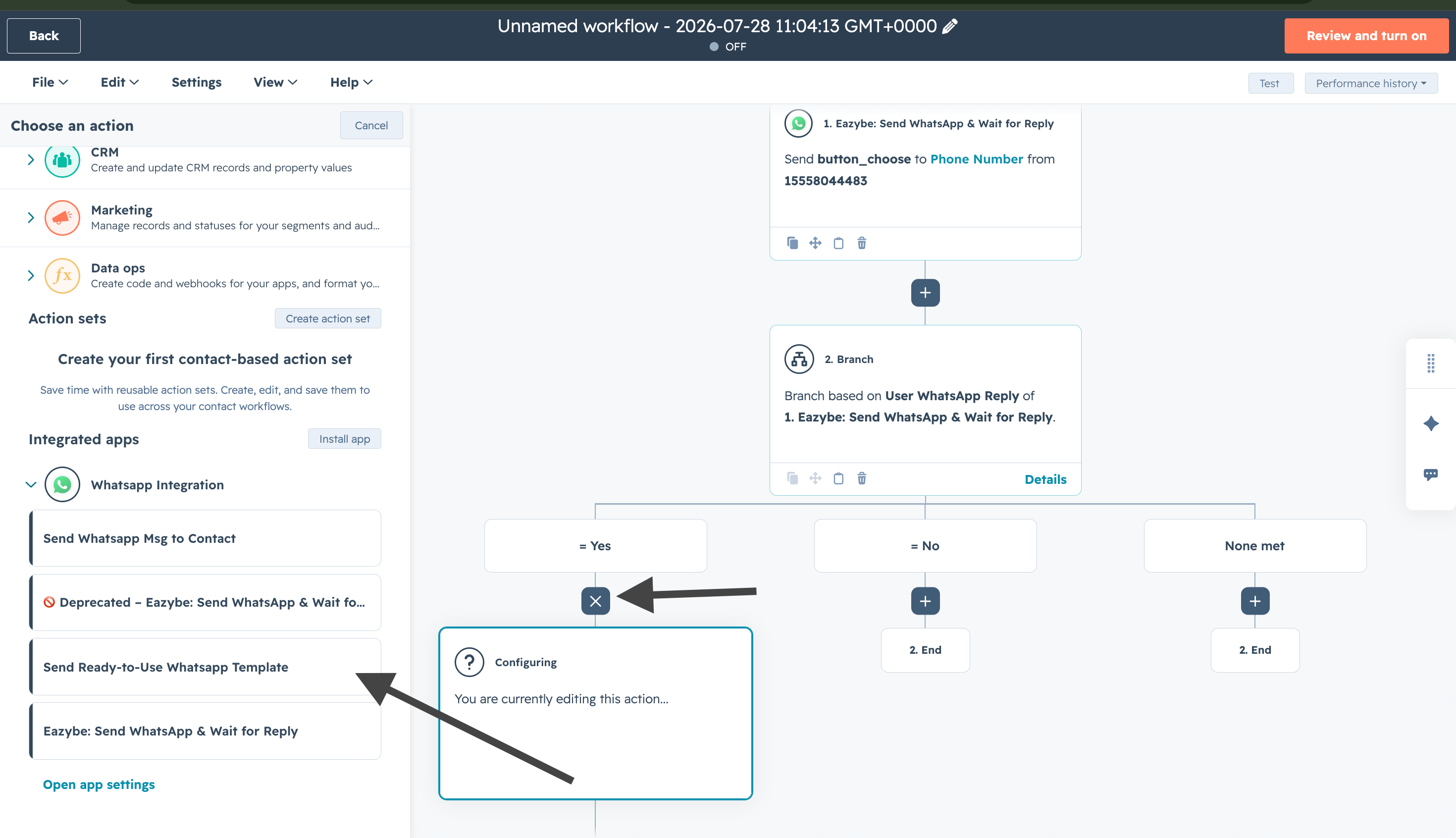
  <Step title="Koşullu dala şablon ekleyin">
    Her dal değerine şablon eklemek için **+** düğmesine tıklayın. Kullanıcı bir düğmeye tıkladığında ilgili şablon tetiklenir.
    <img src="https://mintcdn.com/eazybe/NZtXvr5CRt0MZpuu/images/hubspot-wait-reply-add-template-condition-branch.png?fit=max&auto=format&n=NZtXvr5CRt0MZpuu&q=85&s=30220606afbb35a3df1478f253962e2d" alt="Koşullu dala şablon ekleyin" width="2940" height="1692" data-path="images/hubspot-wait-reply-add-template-condition-branch.png" />
  </Step>

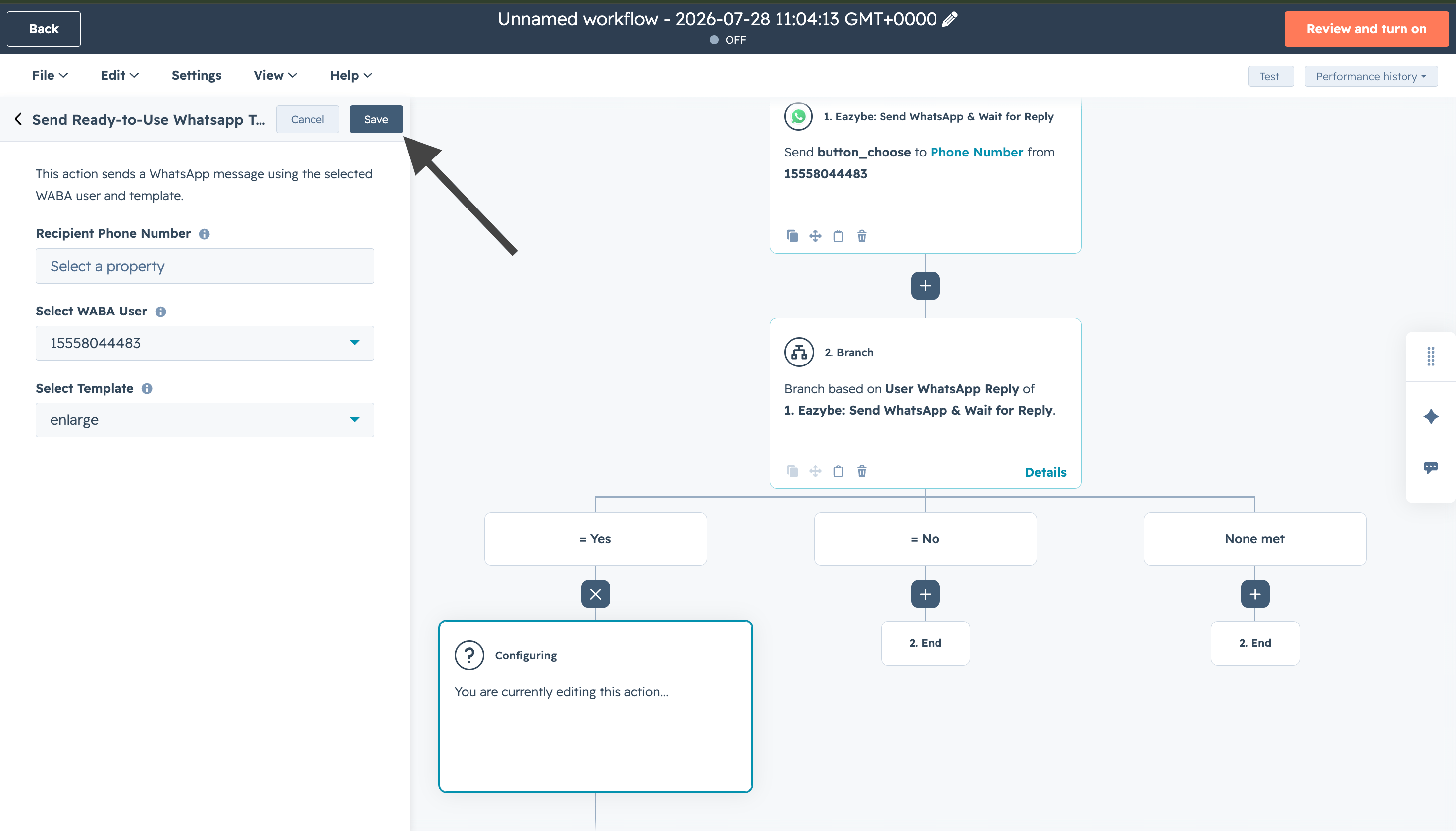
  <Step title="Şablonu kaydedin">
    Dal değerinin şablonunu kaydetmek için **Save** seçeneğine tıklayın.
    <img src="https://mintcdn.com/eazybe/NZtXvr5CRt0MZpuu/images/hubspot-wait-reply-save-branch-template.png?fit=max&auto=format&n=NZtXvr5CRt0MZpuu&q=85&s=57c2bef7e8894d5b29e0b90ff7a9e344" alt="Şablonu kaydedin" width="2940" height="1678" data-path="images/hubspot-wait-reply-save-branch-template.png" />
  </Step>

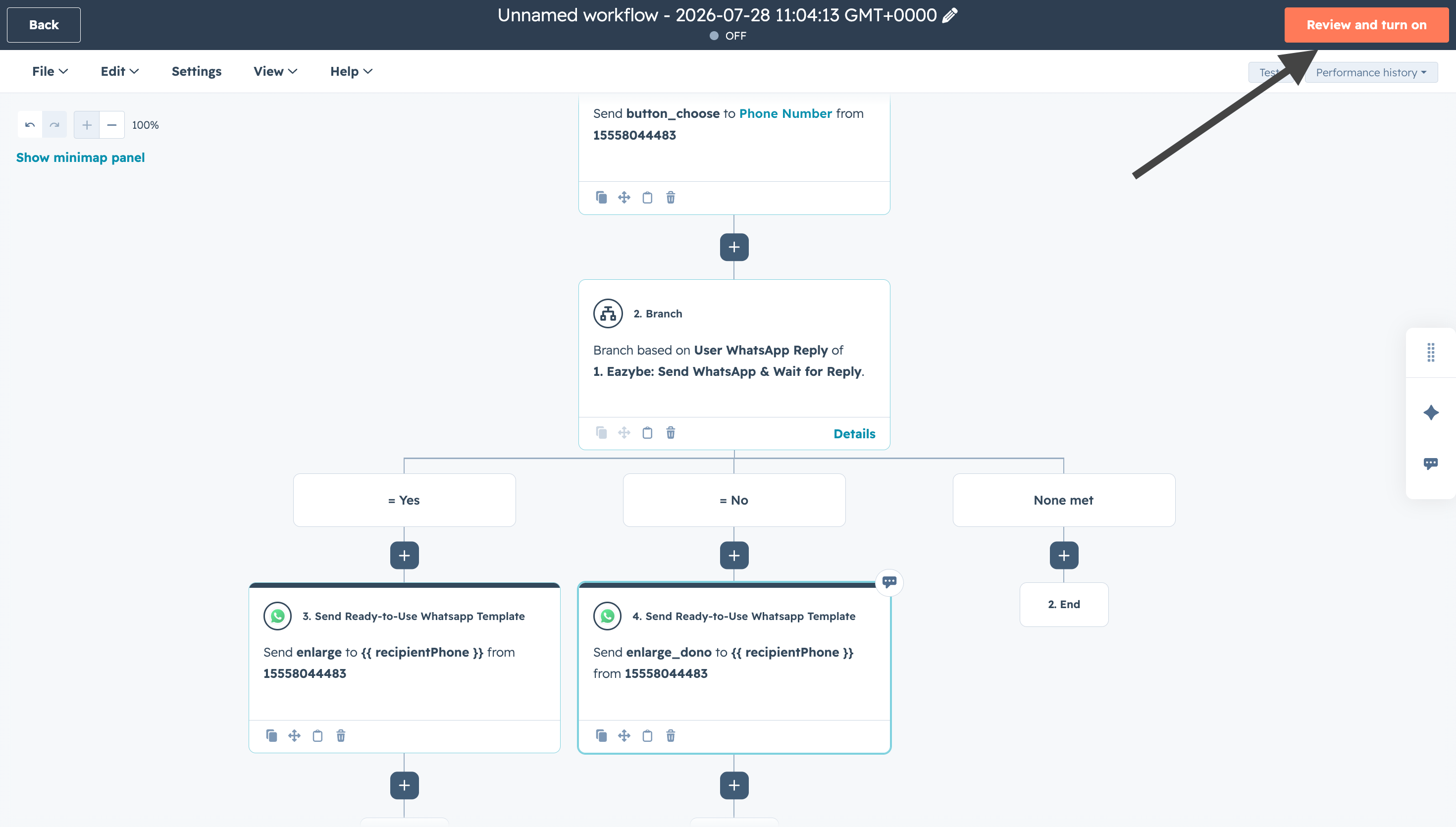
  <Step title="İnceleyin ve etkinleştirin">
    Tüm dal değerlerine şablon ekledikten sonra **Review and turn on** seçeneğine tıklayın.
    <img src="https://mintcdn.com/eazybe/NZtXvr5CRt0MZpuu/images/hubspot-wait-reply-review-and-turn-on.png?fit=max&auto=format&n=NZtXvr5CRt0MZpuu&q=85&s=97b2c03371c6a2cba72c69b2782b145e" alt="İnceleyin ve etkinleştirin" width="2940" height="1670" data-path="images/hubspot-wait-reply-review-and-turn-on.png" />
  </Step>

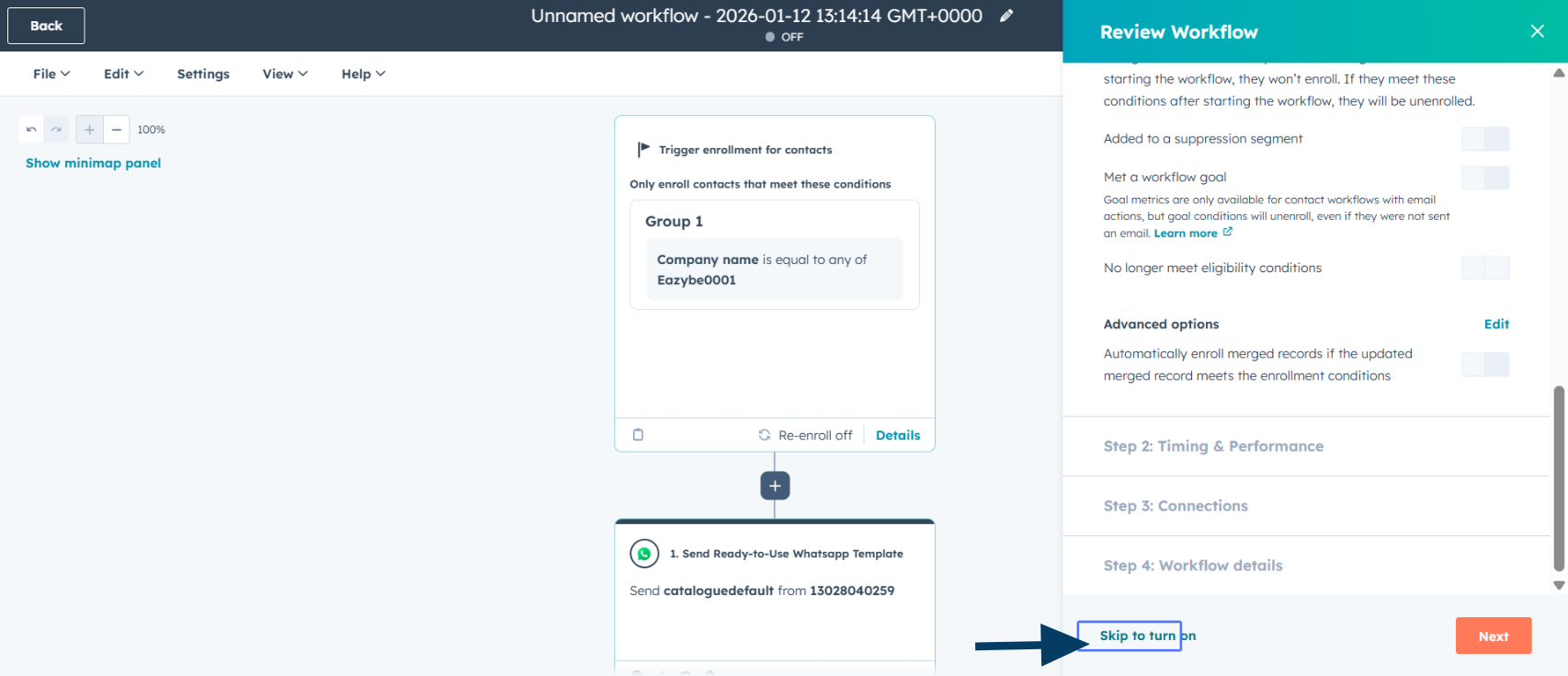
  <Step title="Son incelemeyi yapın">
    **Skip to turn on** veya ek kontroller için **Next** seçeneğine tıklayın.
    <img src="https://mintcdn.com/eazybe/sttSA_SpGc2Das_j/images/1933597322.png?fit=max&auto=format&n=sttSA_SpGc2Das_j&q=85&s=17f0aac402513087df3d72d8b69cdf28" alt="Son inceleme" width="1706" height="735" data-path="images/1933597322.png" />
  </Step>

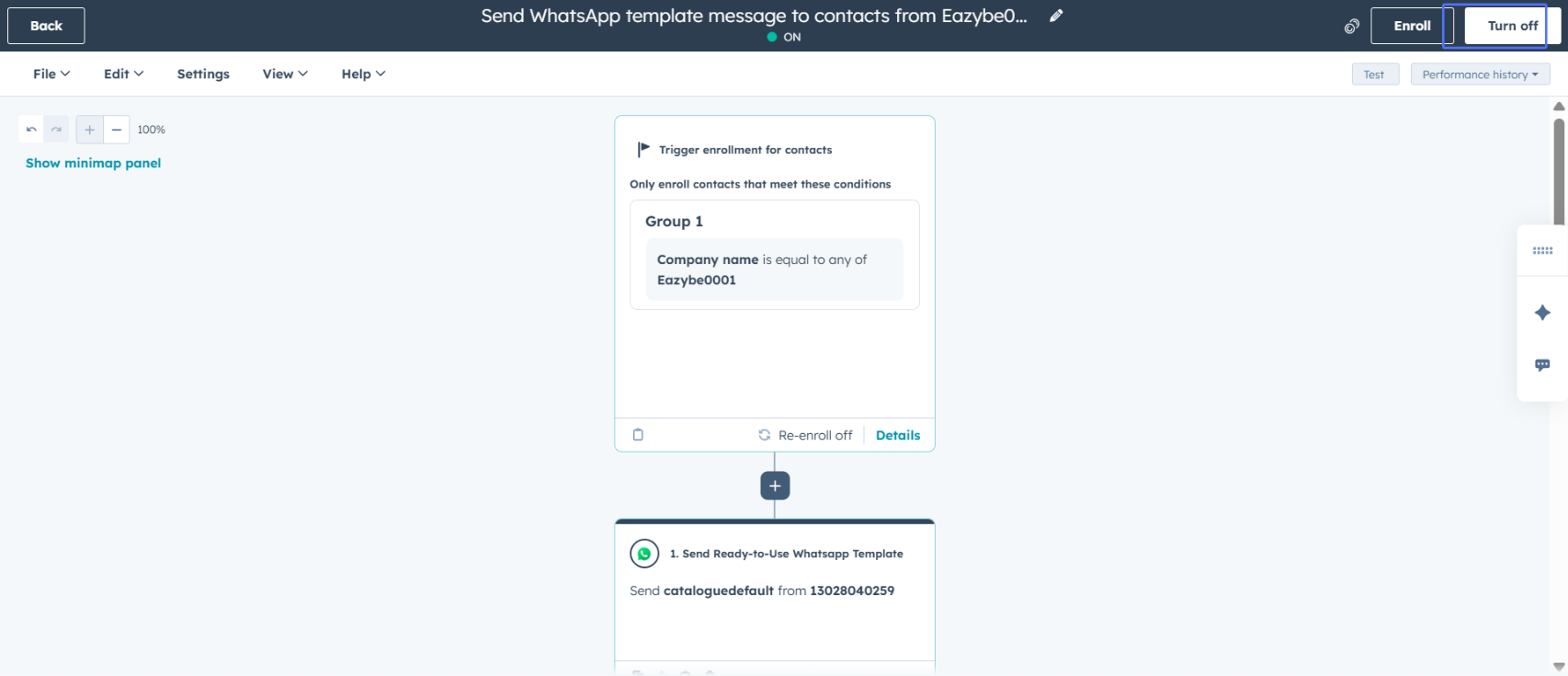
  <Step title="İş akışını etkinleştirin">
    **Turn on workflow** seçeneğine tıklayın.
    <img src="https://mintcdn.com/eazybe/sttSA_SpGc2Das_j/images/1933597319.png?fit=max&auto=format&n=sttSA_SpGc2Das_j&q=85&s=8282bc7471da0efd3a29d105b490b361" alt="İş akışını etkinleştirin" width="1706" height="735" data-path="images/1933597319.png" />
  </Step>
</Steps>

## İş akışınız hazır

İş akışınız WhatsApp mesajları gönderebilir ve kişileri seçtikleri düğmeye göre yönlendirebilir.

<Check>
  Bir kişi kayıt ölçütlerini karşıladığında iş akışı tetiklenir ve yanıta karşılık gelen dalda devam eder.
</Check>

## İlgili kaynaklar

<CardGroup cols={2}>
  <Card title="İş akışlarıyla WhatsApp gönderme" icon="paper-plane" href="/tr/integrations/hubspot/create-workflow">
    HubSpot'ta WhatsApp mesajları gönderme
  </Card>

  <Card title="İş akışı sorunlarını giderme" icon="wrench" href="/tr/integrations/hubspot/workflow-troubleshoot">
    Yaygın sorunlar ve çözümleri
  </Card>

  <Card title="HubSpot değişkenleriyle şablon oluşturma" icon="file-code" href="/tr/waba/templates/how-to-create-template-with-hubspot-variables">
    Şablonlarda HubSpot özelliklerini kullanma
  </Card>

  <Card title="Yayın kampanyaları" icon="bullhorn" href="/tr/waba/broadcasting/create-campaign">
    Birden çok alıcıya WhatsApp mesajı gönderme
  </Card>
</CardGroup>

## Yardıma mı ihtiyacınız var?

Sorularınız için [support@eazybe.com](mailto:hey@eazybe.com) adresine yazabilirsiniz.