> ## Documentation Index
> Fetch the complete documentation index at: https://help.eazybe.com/llms.txt
> Use this file to discover all available pages before exploring further.
# WhatsApp Sync Issue
> Troubleshooting guide for fixing WhatsApp syncing issues with Zoho CRM
If your WhatsApp conversations aren't syncing with Zoho despite moving conversations forward, this guide will help you resolve the issue.
## Common Cause: Permission Issues
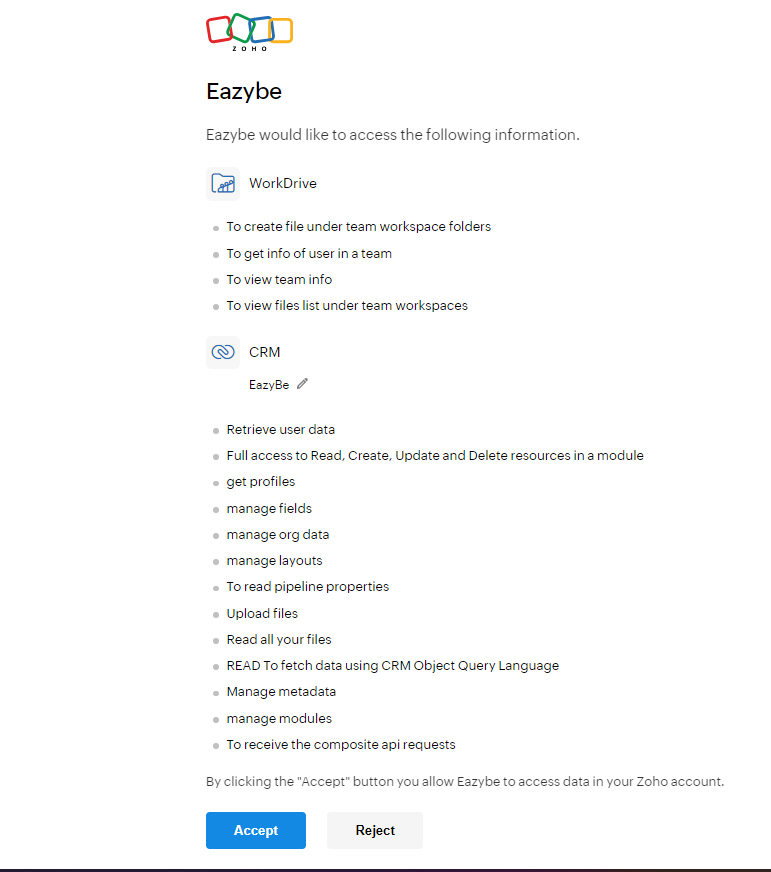
EazyBe requires specific permissions when integrating with Zoho. These permissions are crucial for storing WhatsApp conversations via the EazyBe WhatsApp Extension.
 ## How to Fix the Sync Issue
Ensure that you are part of an organization with **CRM permissions** access. Without these permissions, WhatsApp chats cannot be synced to Zoho.
If you are not already in an organization with the required permissions, you need to either:
* Join an existing organization that has CRM permissions
* Create a new organization to enable proper syncing of WhatsApp chats in Zoho
If permissions were denied during initial setup, disconnect and reconnect the integration to be prompted for permissions again. Make sure to accept all required permissions.
Without the proper CRM permissions granted, EazyBe cannot store your WhatsApp conversations in Zoho. Ensure all permissions are accepted during the integration process.
Organization-level CRM permissions are required for the sync to work properly. Individual user permissions may not be sufficient.
## Need Help?
If you have any questions or need further assistance, feel free to reach out to our support team at [hey@eazybe.com](mailto:hey@eazybe.com).
## How to Fix the Sync Issue
Ensure that you are part of an organization with **CRM permissions** access. Without these permissions, WhatsApp chats cannot be synced to Zoho.
If you are not already in an organization with the required permissions, you need to either:
* Join an existing organization that has CRM permissions
* Create a new organization to enable proper syncing of WhatsApp chats in Zoho
If permissions were denied during initial setup, disconnect and reconnect the integration to be prompted for permissions again. Make sure to accept all required permissions.
Without the proper CRM permissions granted, EazyBe cannot store your WhatsApp conversations in Zoho. Ensure all permissions are accepted during the integration process.
Organization-level CRM permissions are required for the sync to work properly. Individual user permissions may not be sufficient.
## Need Help?
If you have any questions or need further assistance, feel free to reach out to our support team at [hey@eazybe.com](mailto:hey@eazybe.com).