> ## Documentation Index
> Fetch the complete documentation index at: https://help.eazybe.com/llms.txt
> Use this file to discover all available pages before exploring further.
# Scheduler API
> Schedule WhatsApp messages programmatically using the EazyBe Scheduler API
The Scheduler API allows authenticated organizational users to schedule WhatsApp messages programmatically. The API validates user organization membership, verifies required message details, and handles permission issues.
Do not use this API for spam or bulk messaging. Misuse may result in account bans.
## Endpoint
```
POST https://api.eazybe.com/v2/scheduler/public-scheduler
```
Access the API collection via the EazyBe shared Postman workspace.
## Authentication
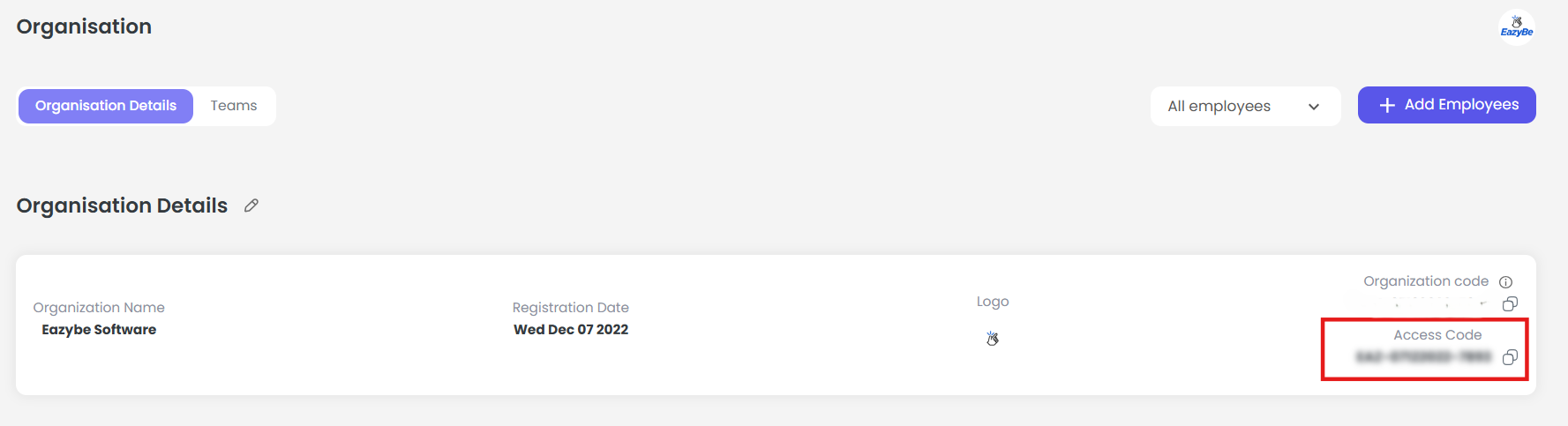
You need to obtain the **Organization Auth Token** from your EazyBe Workspace.
Go to [workspace.eazybe.com](https://workspace.eazybe.com)
An admin needs to access the Organization page.
The Organization Auth Token will be displayed on this page. Copy it for API use.
 ## Request Payload
The API requires the following fields:
| Field | Type | Description |
| --------- | ------ | ---------------------------------------------- |
| `from` | string | Sender's organizational email address |
| `to` | string | Receiver's phone number (international format) |
| `message` | string | Text content to send |
| `name` | string | Receiver's name for notifications |
| `time` | string | Scheduled delivery timestamp (ISO 8601 format) |
### Example Payload
```json theme={null}
{
"from": "hello@eazybe.com",
"to": "919876543210",
"message": "Hello World",
"name": "Vats",
"time": "2024-03-01T17:25:00.000Z"
}
```
## Code Example (Node.js)
```javascript theme={null}
const axios = require('axios');
const config = {
method: 'post',
url: 'https://api.eazybe.com/v2/scheduler/public-scheduler',
headers: {
'Authorization': 'Bearer YOUR_ORGANIZATION_AUTH_TOKEN',
'Content-Type': 'application/json'
},
data: {
from: 'hello@eazybe.com',
to: '919876543210',
message: 'Hello World',
name: 'Vats',
time: '2024-03-01T17:25:00.000Z'
}
};
axios(config)
.then(response => console.log(response.data))
.catch(error => console.error(error));
```
## Response Status
| Status | Description |
| ----------- | --------------------------------------------------- |
| **Success** | Message scheduled successfully |
| **Failure** | Invalid email, missing fields, or permission issues |
## Best Practices
Ensure the sender email belongs to your organization
Do not use for mass messaging or spam activities
Maintain a valid Organization Auth Token
Use international phone number format (e.g., 919876543210)
***
If you have any questions or need further assistance, feel free to reach out to us at **[hey@eazybe.com](mailto:hey@eazybe.com)**. We're happy to help!
## Request Payload
The API requires the following fields:
| Field | Type | Description |
| --------- | ------ | ---------------------------------------------- |
| `from` | string | Sender's organizational email address |
| `to` | string | Receiver's phone number (international format) |
| `message` | string | Text content to send |
| `name` | string | Receiver's name for notifications |
| `time` | string | Scheduled delivery timestamp (ISO 8601 format) |
### Example Payload
```json theme={null}
{
"from": "hello@eazybe.com",
"to": "919876543210",
"message": "Hello World",
"name": "Vats",
"time": "2024-03-01T17:25:00.000Z"
}
```
## Code Example (Node.js)
```javascript theme={null}
const axios = require('axios');
const config = {
method: 'post',
url: 'https://api.eazybe.com/v2/scheduler/public-scheduler',
headers: {
'Authorization': 'Bearer YOUR_ORGANIZATION_AUTH_TOKEN',
'Content-Type': 'application/json'
},
data: {
from: 'hello@eazybe.com',
to: '919876543210',
message: 'Hello World',
name: 'Vats',
time: '2024-03-01T17:25:00.000Z'
}
};
axios(config)
.then(response => console.log(response.data))
.catch(error => console.error(error));
```
## Response Status
| Status | Description |
| ----------- | --------------------------------------------------- |
| **Success** | Message scheduled successfully |
| **Failure** | Invalid email, missing fields, or permission issues |
## Best Practices
Ensure the sender email belongs to your organization
Do not use for mass messaging or spam activities
Maintain a valid Organization Auth Token
Use international phone number format (e.g., 919876543210)
***
If you have any questions or need further assistance, feel free to reach out to us at **[hey@eazybe.com](mailto:hey@eazybe.com)**. We're happy to help!