> ## Documentation Index
> Fetch the complete documentation index at: https://help.eazybe.com/llms.txt
> Use this file to discover all available pages before exploring further.
# WhatsApp Sync Issue
> Troubleshoot and fix WhatsApp syncing issues with Salesforce when your conversations aren't backing up properly.
Your WhatsApp conversations aren't syncing with Salesforce? You're moving your conversations forward, but the backup isn't getting stored on Salesforce. Follow this guide to resolve the issue.
## Check Your Account
Ensure you have either a **Salesforce Developer Account** or **Salesforce Professional Edition**.
The integration does not support trial or Starter accounts.
Make sure both your Salesforce and Eazybe accounts maintain active standing.
## Grant Access
Eazybe asks for specific permissions when integrating with Salesforce. Ensure that these permissions are granted, as they are crucial for storing WhatsApp conversations via the Eazybe WhatsApp Extension.
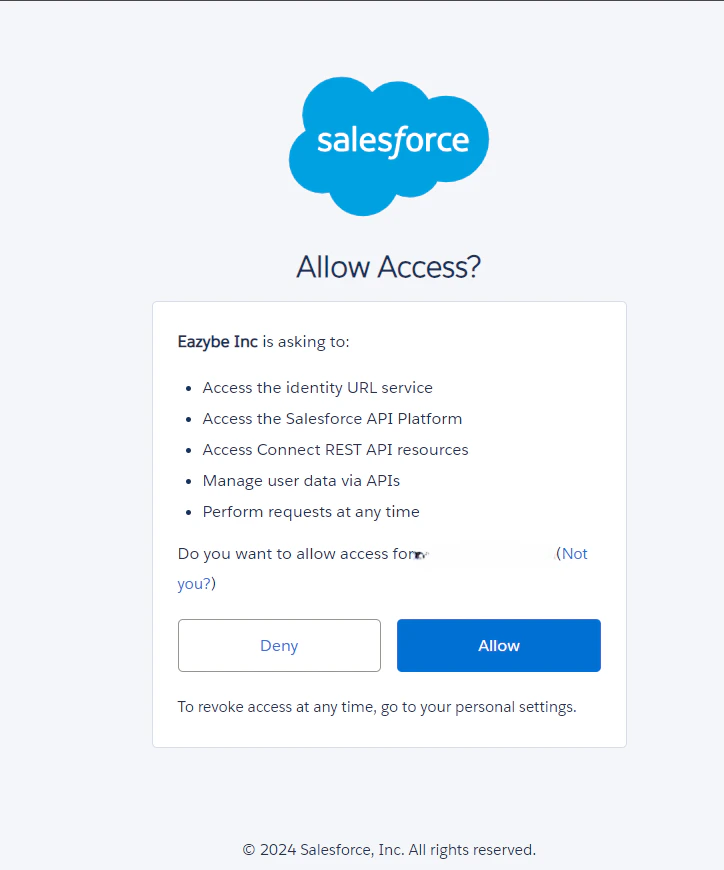 Accept all prompts during the integration process to enable smooth syncing of WhatsApp chats in Salesforce.
## Need Help?
For additional assistance, contact us at [hey@eazybe.com](mailto:hey@eazybe.com).
Accept all prompts during the integration process to enable smooth syncing of WhatsApp chats in Salesforce.
## Need Help?
For additional assistance, contact us at [hey@eazybe.com](mailto:hey@eazybe.com).