> ## Documentation Index
> Fetch the complete documentation index at: https://help.eazybe.com/llms.txt
> Use this file to discover all available pages before exploring further.
# Required Permissions for Integration
> Learn what permissions are required for the Salesforce integration with Eazybe WhatsApp Chrome Extension.
The necessary permissions will be prompted during the integration process. Be sure to accept these permissions.
## Why Are Permissions Required?
These permissions are vital for enabling smooth synchronization and backup functionality for your WhatsApp conversations when using the Eazybe WhatsApp Chrome Extension.
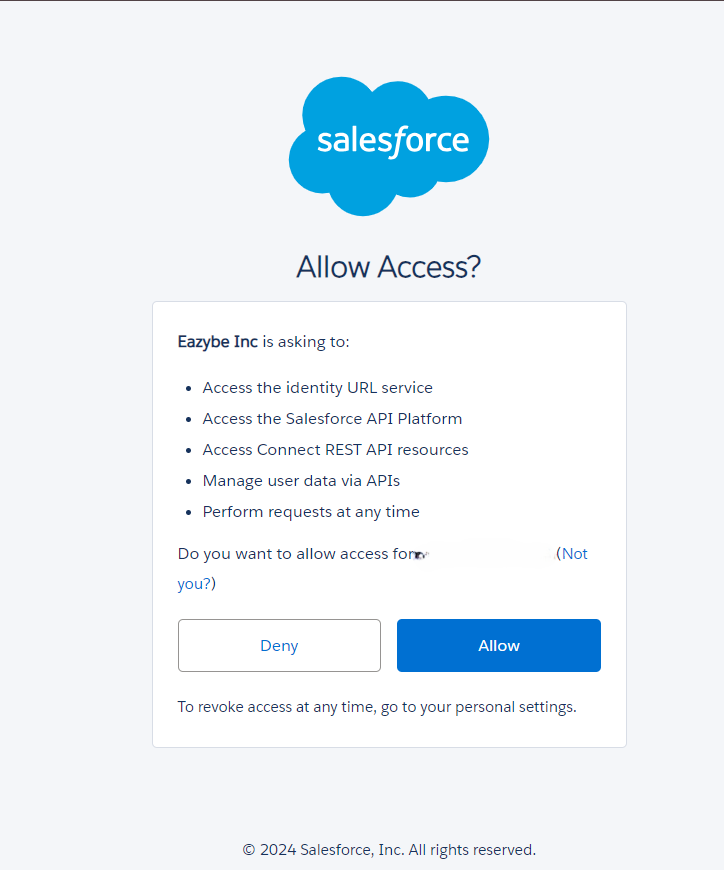 Make sure to accept all requested permissions during the integration process. Declining permissions may result in limited functionality.
## Need Help?
For additional assistance, contact us at [hey@eazybe.com](mailto:hey@eazybe.com).
Make sure to accept all requested permissions during the integration process. Declining permissions may result in limited functionality.
## Need Help?
For additional assistance, contact us at [hey@eazybe.com](mailto:hey@eazybe.com).