> ## Documentation Index
> Fetch the complete documentation index at: https://help.eazybe.com/llms.txt
> Use this file to discover all available pages before exploring further.
# Last Sync Time
> Learn how to check the last sync time for your team using the Salesforce integration in Eazybe Workspace.
Admins can check the last sync time for their team on the Eazybe Workspace.
## How to Check Last Sync Time
Admin should log in to the [Eazybe Workspace](https://workspace.eazybe.com/) using their credentials.
Click on the **Dashboard** button.
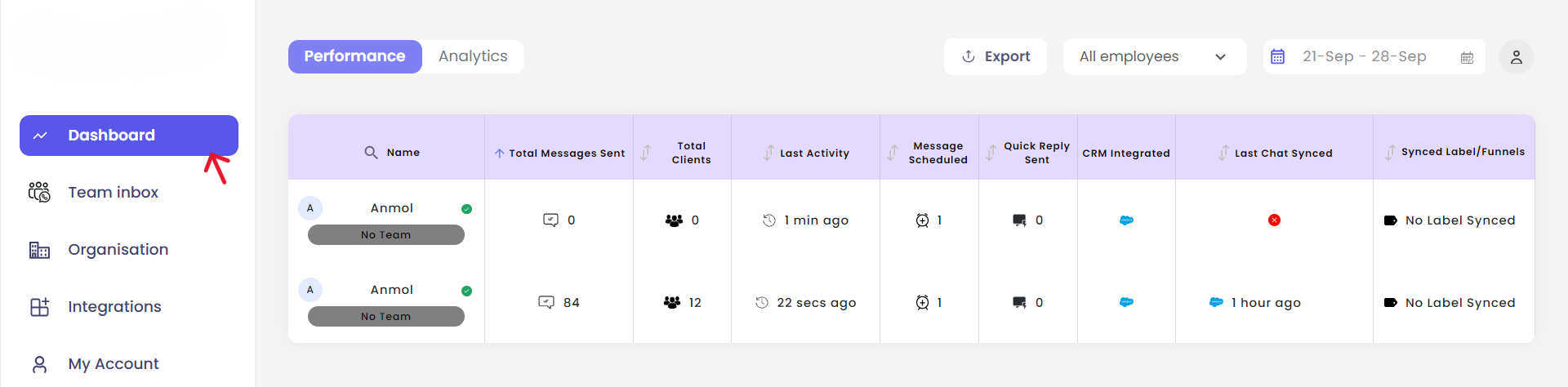 In the **Last Chat Synced** column, you will see the last sync time of the Salesforce chats for all your employees.
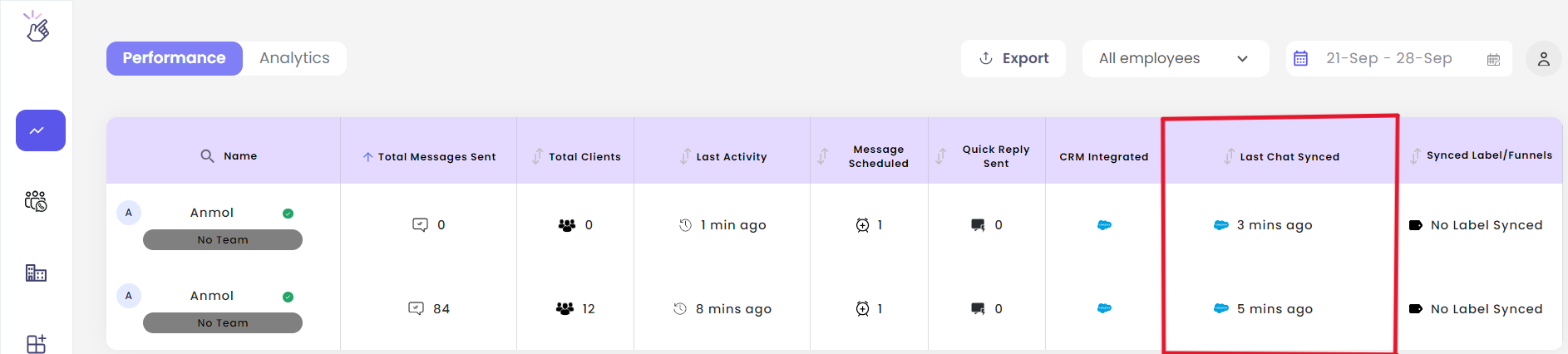 The Last Chat Synced column helps you monitor team activity and ensure all conversations are being backed up properly.
## Need Help?
If you have any questions or need further assistance, feel free to reach out to us at [hey@eazybe.com](mailto:hey@eazybe.com). We're happy to help!
The Last Chat Synced column helps you monitor team activity and ensure all conversations are being backed up properly.
## Need Help?
If you have any questions or need further assistance, feel free to reach out to us at [hey@eazybe.com](mailto:hey@eazybe.com). We're happy to help!