> ## Documentation Index
> Fetch the complete documentation index at: https://help.eazybe.com/llms.txt
> Use this file to discover all available pages before exploring further.
# Analytics
> View lead details, scores, and engagement metrics from the LeadSquared Analytics section
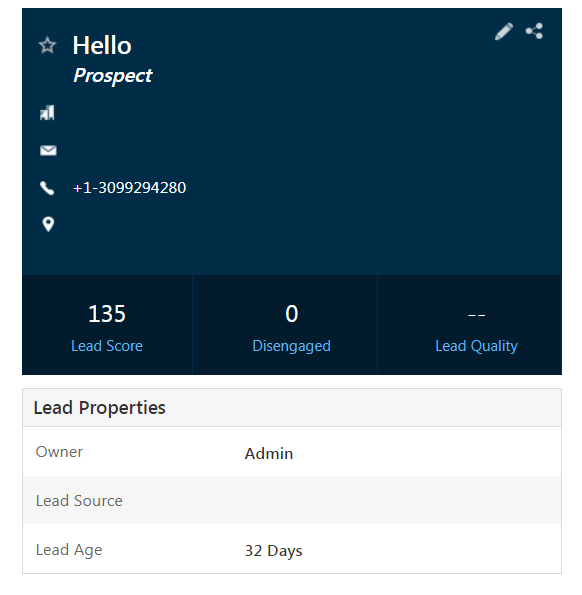
The LeadSquared Analytics section provides valuable insights about your leads, offering statistical measures to capture lead activities and gauge their level of engagement.
 ## Key Analytics Metrics
A cumulative metric reflecting how engaged a lead is. This score is calculated by assigning points to different lead activities within the application.
These metrics identify purchase-ready leads by analyzing activities leads are performing on your user interface, giving you an idea of their interests and behavior.
Displays key information such as the lead owner, lead source, and lead age—how long the lead has been using your services.
Use these analytics to prioritize leads based on their engagement level and readiness to convert.
## Need Help?
If you have questions or need assistance, contact support at **[hey@eazybe.com](mailto:hey@eazybe.com)**.
## Key Analytics Metrics
A cumulative metric reflecting how engaged a lead is. This score is calculated by assigning points to different lead activities within the application.
These metrics identify purchase-ready leads by analyzing activities leads are performing on your user interface, giving you an idea of their interests and behavior.
Displays key information such as the lead owner, lead source, and lead age—how long the lead has been using your services.
Use these analytics to prioritize leads based on their engagement level and readiness to convert.
## Need Help?
If you have questions or need assistance, contact support at **[hey@eazybe.com](mailto:hey@eazybe.com)**.