> ## Documentation Index
> Fetch the complete documentation index at: https://help.eazybe.com/llms.txt
> Use this file to discover all available pages before exploring further.

# Introduction

> Use one authenticated Eazybe REST API to work with WhatsApp Business Cloud API resources.

The Eazybe Meta API gives your backend a single REST surface for WhatsApp Business Cloud API operations. Connect a WhatsApp Business Account (WABA) to Eazybe once, then use Eazybe credentials to manage messages, templates, media, analytics, phone numbers, and related Meta resources.

You do not need to send a Meta access token, select a Graph API version, or implement Meta token refresh. Eazybe resolves the connected WABA and its credentials for each request.

<CardGroup cols={2}>
  <Card title="Quickstart" icon="rocket" href="/api-reference/meta/quickstart">
    Discover your IDs and send your first template message.
  </Card>

  <Card title="List phone numbers" icon="phone" href="/api-reference/meta/operations/get-phone-numbers">
    Find the WABA and phone-number IDs used by the other endpoints.
  </Card>
</CardGroup>

## Base path

```text theme={null}
https://cerberus.eazybe.com/staging/api/v2/meta
```

The wrapper currently targets WhatsApp Cloud API Graph `v25.0`.

## Authentication

<Steps>
  <Step>
    <h3>Use your bearer token</h3>
    <p>Send your Eazybe bearer token with every request:</p>

    ```http theme={null}
    Authorization: Bearer YOUR_EAZYBE_TOKEN
    Content-Type: application/json
    ```

    <Warning>
      Keep bearer tokens on your server. Do not expose them in browser code, mobile
      applications, public repositories, support tickets, or client-side logs.
    </Warning>
  </Step>

  <Step>
    <h3>Find your bearer token</h3>

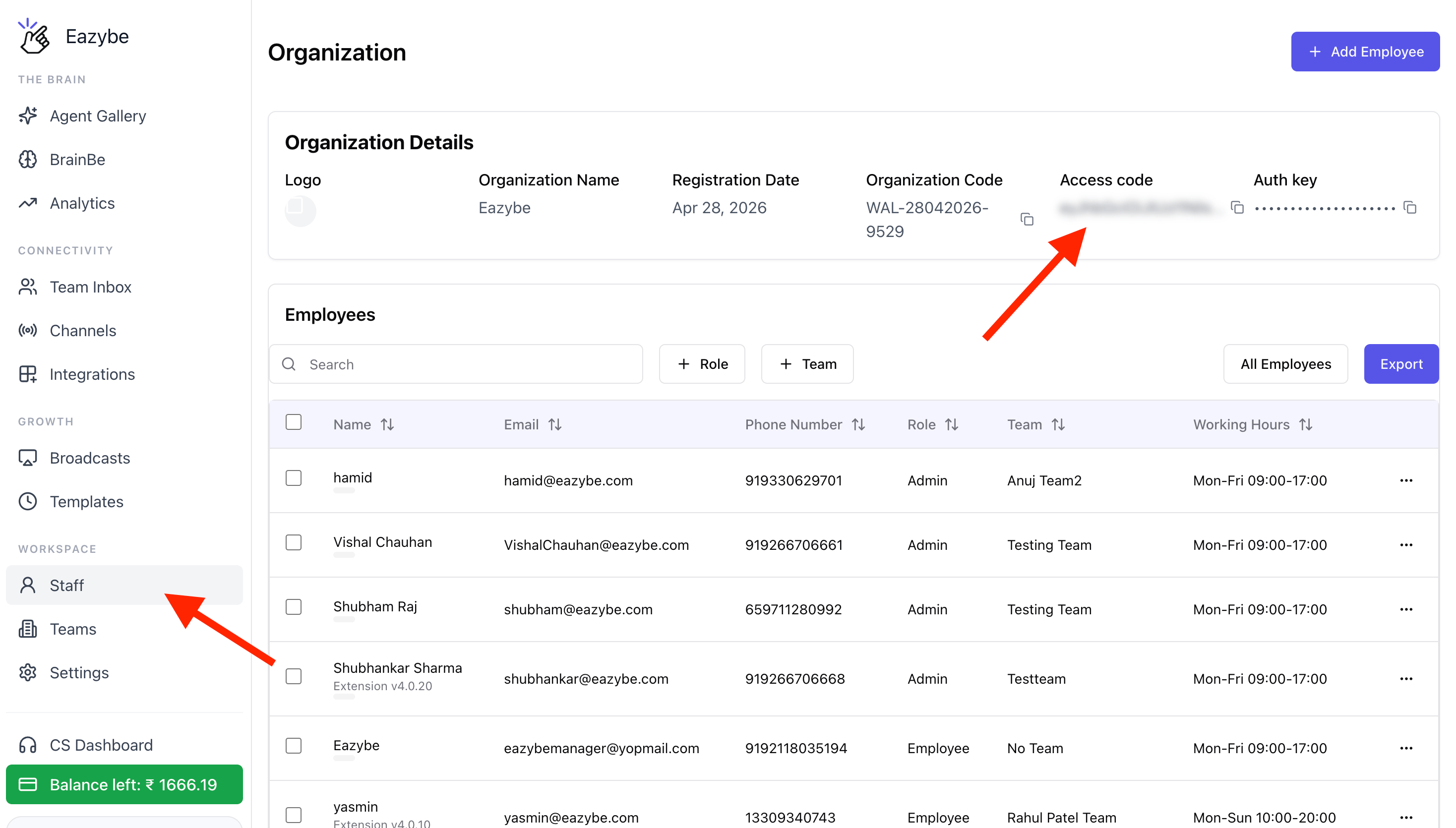
    1. Sign in to the [Eazybe Workspace](https://app.eazybe.com/organization/employees).
    2. In the left sidebar, go to **Workspace** → **Staff**.
    3. In **Organization Details**, find **Access code** and click the copy icon. This Access code is your Eazybe bearer token.
    4. Store the token securely on your server.
    <Frame>
      <img src="https://mintcdn.com/eazybe/ymCi43cqPEYVB7VD/images/meta-api-access-code.png?fit=max&auto=format&n=ymCi43cqPEYVB7VD&q=85&s=2b65a2843c28a581e90b90d3e451b730" alt="Find your bearer token under Workspace, Staff, and Access code" width="2936" height="1670" data-path="images/meta-api-access-code.png" />
    </Frame>
  </Step>
</Steps>

Your organization is derived from the token. A `phoneNumberId` or `wabaId` that is not connected to that organization returns `404` instead of exposing another organization's data.

## Capabilities

| Area             | What you can do                                                                                                       |
| ---------------- | --------------------------------------------------------------------------------------------------------------------- |
| Phone numbers    | List connected numbers and inspect status, quality rating, and verification state                                     |
| Messaging        | Send templates, marketing templates, free-form text, media, contacts, reactions, read receipts, and typing indicators |
| Bulk messaging   | Send one template to multiple recipients with per-recipient variables and a delivery summary                          |
| Templates        | List, create, edit, delete, migrate, compare, and create from Meta's template library                                 |
| Media            | Upload files, retrieve media metadata and download URLs, and delete media                                             |
| Business profile | Read and update the public profile and phone-number settings                                                          |
| Analytics        | Read messaging, conversation, pricing, and template analytics                                                         |
| Flows            | Create, update, publish, deprecate, delete, and upload JSON assets                                                    |
| QR codes         | Manage click-to-chat QR codes and prefilled messages                                                                  |
| Automation       | Configure ice-breakers, commands, and welcome messages                                                                |
| Administration   | Register numbers, manage two-step verification, webhooks, blocked users, and coexistence sync                         |

## Resource IDs

Call `GET /meta/phone-numbers` first. Its response contains the two identifiers used throughout this reference:

| Identifier           | Use                                                                                                         |
| -------------------- | ----------------------------------------------------------------------------------------------------------- |
| `phone_numbers[].id` | Use as `phoneNumberId` for messaging, media, profile, QR-code, automation, and number-administration routes |
| `accounts[].waba_id` | Use as `wabaId` for template, analytics, Flow, webhook-subscription, and WABA-detail routes                 |

If an organization has multiple WABAs, each appears as a separate account. A connection that needs authorization returns `status: false` with an error while the remaining accounts continue to resolve.

## Request conventions

| Rule                        | Behavior                                                                                             |
| --------------------------- | ---------------------------------------------------------------------------------------------------- |
| Recipient format            | Use international digits without `+`, spaces, or punctuation, for example `919900000001`             |
| Request and response shapes | The wrapper generally accepts and returns WhatsApp Cloud API shapes without modification             |
| `messaging_product`         | Added automatically to message requests                                                              |
| `fields`                    | Optional on most `GET` operations; pass a comma-separated Graph field list to customize the response |
| Content type                | Use JSON except for media and Flow-asset uploads, which use `multipart/form-data`                    |
| Upstream timeout            | Meta requests time out after 15 seconds                                                              |

`GET /meta/phone-numbers` is the primary wrapped response. Most other successful responses are passed through from Meta.

## Errors

| Status | Meaning                                                                  | Recommended action                                          |
| ------ | ------------------------------------------------------------------------ | ----------------------------------------------------------- |
| `400`  | Meta rejected the request                                                | Correct the request using `error.message` and `error.code`  |
| `401`  | The Eazybe bearer token is missing, invalid, or expired                  | Authenticate again and retry with a valid token             |
| `404`  | The requested WABA or phone number is not connected to your organization | List phone numbers again and reconnect the WABA if required |
| `429`  | Meta rate or usage limits were reached                                   | Retry with exponential backoff                              |
| `502`  | Meta was unreachable or the upstream call timed out                      | Reconcile using webhooks before retrying a send             |

```json theme={null}
{
  "status": false,
  "message": "Template name does not exist in the translation",
  "error": {
    "message": "Template name does not exist in the translation",
    "type": "OAuthException",
    "code": 132001,
    "error_subcode": 2494010,
    "fbtrace_id": "A1bC2dE3fG4"
  }
}
```

Use Meta's numeric `error.code` for programmatic handling. Retry `502` responses and Meta rate-limit codes such as `130429` and `131056` with backoff. Do not retry every `4xx` response because the request itself may need to be corrected.

## Operational limits

* Free-form and non-template messages are available only within 24 hours of the customer's last message. Use an approved template outside that window.
* Recipients must have opted in. Marketing messages are subject to Meta's daily and quality-based limits.
* New templates start in `PENDING` state and cannot be sent until Meta approves them.
* Send operations are not idempotent. Record the returned WhatsApp message ID (`wamid`) and guard retries in your application.
* A `502` can represent an unknown send outcome. Check webhook delivery events before sending the same message again.
* The wrapper does not cover WhatsApp Calling, commerce/catalog management, payments, or embedded signup.
